Samsung Galaxy Book6 Pro Review: A Display That Changes Everything
The Samsung Galaxy Book6 Pro delivers one of the best laptop displays money can buy, combined with exceptional battery life from Intel's Panther Lake processors and a premium aluminum build. Its integrated GPU limitations and mediocre webcam hold it back from perfection, but for display-focused creative professionals, this is the Windows laptop to beat in 2026.
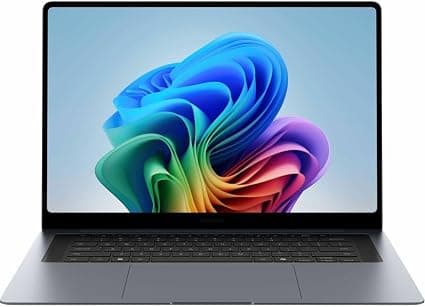
When Samsung unveiled the Galaxy Book6 series at CES 2026, the company made a bold claim: this would be the laptop line that finally challenges Apple's MacBook Pro dominance on Windows turf. After spending two weeks with the Galaxy Book6 Pro 16-inch model, I can say with confidence that Samsung has delivered something genuinely compelling — and in some ways, genuinely surprising.
The Galaxy Book6 Pro sits in an interesting position within Samsung's 2026 lineup. It's not the top-tier Ultra model with discrete Nvidia graphics, but it's far from a budget compromise. At its $1,599 starting price for the 14-inch configuration, the Pro aims squarely at creative professionals, power users, and anyone who wants a premium Windows laptop that doesn't scream "gamer." And with the shift to Intel's Panther Lake architecture — the Core Ultra Series 3 platform built on Intel's new 18A process — there are real architectural improvements to talk about.
Let me be clear upfront: the display on this laptop is the star of the show. But the Galaxy Book6 Pro is more than just a pretty screen. It's a thoughtfully engineered machine that makes some genuinely smart tradeoffs, alongside a few frustrating compromises.
Design and Build Quality
Samsung has refined the Galaxy Book design language over several generations, and the Book6 Pro represents the most polished iteration yet. The all-aluminum chassis feels dense and premium in hand — there's no flex in the keyboard deck, the lid opens smoothly with one finger, and the hinge mechanism inspires confidence. At 3.5 pounds for the 16-inch model, it's lighter than a 16-inch MacBook Pro by nearly a full pound, and at just 0.46 inches thick, it slips into bags that most 16-inch laptops wouldn't fit.
The design language is unmistakably Samsung. The clean, minimalist lines, the subtle "Galaxy Book" branding on the lid, and the two-tone silver finish all contribute to a laptop that looks equally at home in a coffee shop, a boardroom, or a creative studio. The curved display corners are a Samsung signature at this point — and they remain divisive. Sometimes they give the screen a distinctive, modern look. Other times, interface elements at the corners of the display get clipped in ways that feel unintentional. It's a design choice you'll either love or learn to tolerate.
The port selection is genuinely impressive for a laptop this thin. You get two Thunderbolt 4 ports (USB-C with DisplayPort and Power Delivery), a full-size USB-A 3.2 port, HDMI 2.1, and a 3.5mm headphone jack. The HDMI 2.1 support is particularly welcome for connecting to 4K monitors or modern TVs at full 60Hz without compression. One notable omission, however, is the microSD card slot that previous Galaxy Book models included — a frustrating removal for photographers and content creators who rely on quick card access. You will need a USB-C card reader dongle.
The Display: Samsung's Ace in the Hole
Samsung makes arguably the best OLED panels in the world, and the Galaxy Book6 Pro benefits directly from that expertise. The 16-inch Dynamic AMOLED 2X display is a genuine stunner. With a 2880x1800 resolution, 120Hz refresh rate, and touch support, it delivers an experience that desktop monitors costing twice as much struggle to match.
Color accuracy is exceptional out of the box. The display covers 100 percent of the DCI-P3 and sRGB gamuts, with a measured Delta E of just 0.5 — that's objectively superb, placing it in the same league as专业 reference monitors. Brightness hits 500 nits in standard SDR content, and HDR peak brightness can reach an eye-searing 1,200 nits. Colors punch off the screen, blacks are truly black thanks to OLED's per-pixel lighting, and the 120Hz refresh rate makes scrolling through documents and web pages feel buttery smooth.
The anti-reflective coating Samsung uses here deserves special mention. It cuts glare significantly compared to glossy displays, making the laptop genuinely usable in brightly lit coffee shops or near windows. Samsung also includes its Vision Booster technology, which analyzes ambient lighting and adjusts the display parameters to improve outdoor visibility. It works reasonably well, though direct sunlight on a bright day will still challenge any OLED panel.
There is one important caveat for sensitive users: the display uses PWM (pulse-width modulation) dimming at 240Hz with full amplitude at all brightness levels. If you are sensitive to screen flicker, this could cause eye strain or headaches over extended use. Many modern OLED laptops have this characteristic, but it's worth knowing before you buy.
Performance and the Panther Lake Platform
The Galaxy Book6 Pro ships with Intel's Core Ultra Series 3 processors, codenamed Panther Lake, built on Intel's 18A process node. This is a significant architectural leap — the first Intel client processors to use the RibbonFET gate-all-around transistor design and PowerVia backside power delivery. In plain English, this means better performance per watt than any previous Intel mobile chip.
Our review unit came equipped with the Intel Core Ultra 7 356H, a 16-core CPU (6 performance cores, 8 efficient cores, and 2 low-power efficient cores) with a maximum turbo frequency of 4.8 GHz. It is paired with 32GB of LPDDR5x RAM and a 512GB PCIe 4.0 SSD. In synthetic benchmarks, the CPU performance is strong — Geekbench 6 multi-core scores of roughly 16,900 put it ahead of last year's Galaxy Book5 Pro and competitive with Apple's M4 Pro chip in multi-threaded workloads. Cinebench 2024 multi-core performance is solid at just over 1,000 points.
Here's where the story gets more nuanced. The integrated graphics in our test unit — Intel Graphics with 4 Xe3 cores — is notably slower than what many expected from the Panther Lake platform. In fact, 3DMark scores show it performing worse than the integrated Arc graphics in the previous Meteor Lake generation. This is because the base Core Ultra 7 356H ships with the lower-tier integrated GPU, while the faster Arc B390 graphics (with 12 Xe3 cores) require stepping up to the Core Ultra X7 358H processor.
What does this mean in real-world use? For everyday productivity — web browsing, document editing, spreadsheet work, email, video calls — the machine feels snappy and responsive. PCMark 10 scores above 8,600 confirm excellent system-level performance. Photo editing in Lightroom and Photoshop runs smoothly, even with large RAW files. Video editing in 4K is workable for short projects and light timelines. But if gaming is on your agenda, or if you regularly work with complex 3D renders or heavy After Effects compositions, you will want the X7 processor with the Arc B390 GPU or step up to the Ultra model with discrete Nvidia graphics.
The 512GB SSD in our unit uses PCIe 4.0 and delivers solid sequential read and write speeds. Importantly, the laptop has dual M.2 2280 SSD slots, so storage upgrades are possible — a welcome flexibility that many premium ultrabooks no longer offer.
Keyboard and Trackpad
The haptic trackpad on the Galaxy Book6 Pro is one of the best I have used on a Windows laptop. At roughly 15 by 10.5 centimeters, it is spacious, and the haptic feedback is crisp and satisfying. There is no mechanical hinge — the entire surface clicks uniformly, and the vibration motor delivers convincing tactile feedback. Multi-touch gestures are accurate, palm rejection works well, and the surface has a smooth glass feel that makes cursor navigation effortless.
The keyboard, unfortunately, is less praiseworthy. Samsung has made some design decisions here that power users may find frustrating. Key travel is shallow — noticeably shallower than on a MacBook Air or Lenovo ThinkPad — and the bottom-out feel is mushy rather than crisp. There is no dedicated number pad, which removes valuable territory for users who work extensively with numbers. The keyboard deck also has some sharp edges where the aluminum meets the keys, which can be uncomfortable during long typing sessions.
These are not dealbreakers. The keyboard is perfectly functional for extended writing sessions — I typed thousands of words on it without major complaint. But for a laptop in this price bracket aimed at professionals, the keyboard should be better. The ThinkPad X9, the Dell XPS 16, and even Samsung's own previous generation offered superior typing experiences.
Audio and Webcam
The six-speaker system on the Galaxy Book6 Pro is genuinely excellent. Samsung has moved the speakers from the bottom of the chassis to fire through grilles flanking the keyboard, and the improvement is dramatic. The sound is full, with clean instrument separation, reasonable bass for a laptop, and enough volume to fill a medium-sized room. Jazz and classical music sound open and airy. Dialogue in video calls is clear and natural. This is easily one of the best-sounding Windows laptops I have tested, competitive with the MacBook Pro's class-leading audio.
The webcam, by contrast, is a disappointment. It is a 2MP (1080p) sensor that delivers soft, grainy video in anything less than perfect lighting. In low light, the image becomes noisy and loses detail rapidly. For a laptop that starts at $1,599, this is below the standard set by competitors like the Dell XPS 16 (which offers a 4K webcam option) and even Apple's 12MP Center Stage camera on the MacBook Air. The built-in microphone array is serviceable for calls but not exceptional. If video conferencing is a major part of your workflow, you will want to invest in an external webcam or rely on a smartphone for important calls.
Battery Life and Charging
Battery life is one of the Galaxy Book6 Pro's strongest features. Thanks to Intel's Panther Lake efficiency gains and the 78.07Wh battery in the 16-inch model, the laptop consistently delivered impressive runtimes in testing. In the PCMark 10 Modern Office battery test, the Pro lasted roughly 20 hours. In real-world mixed use — web browsing with 20 to 30 tabs, document editing, Spotify streaming, occasional video calls — I consistently got through two full workdays before reaching for the charger.
Video playback endurance is similarly strong. Streaming 4K content over Wi-Fi at 50 percent brightness delivered over 16 hours of continuous playback. This is genuinely liberating — you can leave the charger at home for multiday trips without anxiety, something rare in the Windows laptop space outside of ARM-based devices.
The included 65W USB-C charger is compact and works through either Thunderbolt 4 port. A 30-minute charge gets you to roughly 50 percent, which is reasonable if not class-leading. The 14-inch model uses the same charger, while the Ultra model upgrades to a 100W or 140W adapter depending on the configuration. USB-C Power Delivery compatibility means you can also charge with any high-wattage GaN charger or power bank.
Thermals and Noise
The Galaxy Book6 Pro is Samsung's first Pro-series laptop to feature vapor chamber cooling, and the results are impressive. Under sustained heavy loads — video exports, extended benchmarking, compiling code — the chassis remains warm but never uncomfortably hot. The fans are barely audible during typical office workloads. Under maximum load in optimized mode, fan noise peaks at a very reasonable 38 decibels, which is quieter than a typical conversation. In high-performance mode, the fans ramp up to roughly 44 decibels, which is audible but not intrusive.
The thermal management does come with one tradeoff: the Core Ultra 7 356H's sustained power limit drops to just 30 watts after peak boost, which is why the integrated GPU performance trails expectations under prolonged loads. The cooling system keeps the chassis comfortable, but the processor has to throttle to maintain those temperatures in the slim chassis.
Samsung Ecosystem Integration
One of the Galaxy Book6 Pro's hidden strengths is its deep integration with Samsung's broader ecosystem. If you own a Samsung Galaxy phone, tablet, or watch, the laptop becomes a central hub in a seamless multi-device experience. Multi Control lets you use the laptop's keyboard and trackpad to control your Galaxy phone and tablet. Quick Share transfers files between devices at Wi-Fi Direct speeds. You can make and receive phone calls directly from the laptop, and your phone's recent photos and notifications appear in your PC workflow automatically.
For existing Samsung users, this integration is genuinely useful and works more smoothly than comparable cross-device features from Apple. For everyone else, these features are invisible and don't detract from the core Windows experience. They are a value-add, not a prerequisite.
Software and AI Features
The Galaxy Book6 Pro ships with Windows 11 and Samsung's native Settings app for managing device-specific features. There is minimal bloatware — a handful of Samsung utilities and Microsoft's standard preloads. The Intel NPU (neural processing unit) on the Panther Lake chip enables on-device AI features like Windows Studio Effects for background blur and eye contact in video calls, live captions, and AI-powered photo editing in compatible apps. With 50 TOPS of NPU performance, the laptop is well-positioned for the coming wave of Windows AI features, including Microsoft's Copilot+ capabilities.
Price and Configuration Options
The Galaxy Book6 Pro is available in two screen sizes (14-inch and 16-inch) and several configurations. The 14-inch model starts at $1,599 with a Core Ultra 7 processor, 16GB of RAM, and 512GB of storage. The 16-inch model starts at $1,799 with the same base specs. Stepping up to 32GB of RAM and 1TB of storage brings the price to roughly $2,100. The XDA review unit with the Core Ultra X7 358H and 32GB of RAM hit $2,099.
The 16-inch model I tested — spec'd with the Core Ultra 7 356H, 32GB RAM, and 512GB SSD — retails for approximately $2,292 on Amazon at the time of writing. That is a significant investment, and it places the Galaxy Book6 Pro in direct competition with high-end models like the Dell XPS 16, the Lenovo ThinkPad X9, and the MacBook Pro 14. Considering the integrated GPU limitation at this price point, the value proposition is strongest for users who prioritize display quality, battery life, and build quality over raw graphics performance.
Compared to the Competition
Against the Dell XPS 16, the Galaxy Book6 Pro offers a superior OLED display and significantly better battery life. Dell's laptop has a better keyboard and a more premium overall feel in some areas, but Samsung's screen advantage is hard to overstate.
Against the MacBook Pro 14, the Galaxy Book6 Pro matches or exceeds Apple's laptop in display quality and actually surpasses it in battery life. The MacBook Pro offers faster CPU and GPU performance, a better keyboard, and a vastly superior webcam. The choice between them largely comes down to ecosystem preference — macOS versus Windows — and whether you need the raw rendering power of Apple's M-series silicon.
Against the Asus Zenbook S16 and the Lenovo Yoga Pro 9i, the Galaxy Book6 Pro holds its own with a brighter, more color-accurate display and better ecosystem integration for Samsung phone users. The Zenbook offers a more competitive price, and the Yoga has a better keyboard. None of them quite match the Galaxy Book6 Pro's combination of display quality and battery life.
Who Should Buy the Galaxy Book6 Pro
The Samsung Galaxy Book6 Pro is a laptop for people who know exactly what they value. If an exceptional OLED display, all-day battery life, and premium build quality are your top priorities, this machine delivers them in spades. It is ideal for creative professionals who work primarily with color-accurate photo editing, for writers and journalists who need a laptop that lasts through long travel days, and for business users who want a professional-looking machine with excellent multimedia capabilities.
It is less suitable for gamers, 3D artists, heavy video editors, or anyone who needs discrete graphics performance. The integrated GPU in the base configuration is genuinely underpowered compared to the previous generation and to competing offerings at this price point. If you need GPU muscle, either spec up to the X7 processor with Arc B390 graphics or step up to the Galaxy Book6 Ultra with its Nvidia RTX 5070.
The keyboard and webcam represent genuine compromises that Samsung should address in future generations. For a laptop positioned as a professional tool, these are not trivial omissions.
Final Thoughts
The Samsung Galaxy Book6 Pro is a confident, well-executed laptop that makes a compelling case for itself in a fiercely competitive market. Its display is among the best I have seen on any laptop, its battery life sets a new standard for Intel-based Windows machines, and its build quality and industrial design are genuinely premium. The integrated GPU limitations, middling keyboard, and disappointing webcam keep it from being a universal recommendation, but for the right buyer — someone who values screen quality and endurance above raw performance — this is arguably the best Windows laptop Samsung has ever made.
The Galaxy Book6 Pro proves that Samsung understands something its competitors sometimes forget: that the display is the one component you interact with every single moment you use a laptop, and getting it right transforms the entire experience. Samsung got it right here.
Real-World Use Cases: Where the Book6 Pro Shines
To give a clearer picture of what daily life with the Galaxy Book6 Pro looks like, I used it as my primary machine for a full workweek covering several different workflows. For productivity work — juggling Slack, Notion, a dozen Chrome tabs, Zoom calls, and Google Docs — the laptop was faultless. The combination of the 120Hz OLED display and the snappy system performance made multitasking feel effortless. Microsoft Excel spreadsheets with thousands of rows scrolled without stutter. Slack notifications, calendar reminders, and background music streaming all coexisted without any perceptible slowdown.
Photo editing in Adobe Lightroom Classic was a particular highlight. Importing and culling a batch of roughly 200 Sony A7 IV RAW files took about four minutes. Rendered previews popped up quickly, and the display's color accuracy made editing decisions confident. Skin tones looked natural, shadow detail was visible without clipping, and the wide color gamut meant that the edits I made on the laptop translated accurately when I viewed the exported JPEGs on my reference monitor.
For video conferencing, the experience was mixed. The six-speaker array made voices sound clear and natural, and the microphone array picked up my voice cleanly in a quiet room. But the webcam's soft 1080p image was noticeably inferior to what I get from the 12MP camera on my MacBook Air. In a well-lit home office, it is acceptable. In a dimly lit room, it is disappointing. If your job involves three or more video calls per day, consider this a sign to invest in a Logitech Brio or similar external webcam.
Build Quality and Longevity Considerations
The Galaxy Book6 Pro feels built to last. The aluminum unibody construction is rigid, the hinge shows no play after repeated opening and closing, and the keyboard deck shows no flex even under deliberate pressure. The Gorilla Glass overlay on the display resists scratches from normal use. The Thunderbolt 4 ports support the latest docking stations and monitors. Samsung typically provides three to four years of driver and firmware updates for its Galaxy Book lineup, and the Panther Lake platform will be supported by Intel for at least that long.
The one longevity concern is the soldered RAM. The 16GB and 32GB memory configurations are soldered to the motherboard and cannot be upgraded after purchase. If you anticipate needing more memory in three to four years, buy the 32GB configuration from the start. The dual M.2 SSD slots provide some future-proofing for storage, which is more than many competitors offer.
Is the Galaxy Book6 Pro Worth It?
At its asking price, the Galaxy Book6 Pro occupies a specific niche. It is not the most powerful laptop you can buy for the money — the MacBook Pro 14 with the M4 or M5 chip offers faster CPU and GPU performance, and the Dell XPS 16 offers a better keyboard. But the Galaxy Book6 Pro delivers something that neither of those laptops can match: a display that makes everything you look at on it look visibly better, combined with battery life that genuinely lasts through two days of work without anxiety.
For creative professionals who prioritize color-critical work, for frequent travelers who need endurance, and for Samsung ecosystem users who want the best possible integration between their phone and laptop, the Galaxy Book6 Pro is an easy recommendation. For gamers, heavy renderers, or anyone on a strict budget, the compromises are real and worth considering carefully.
The Samsung Galaxy Book6 Pro is a laptop that knows exactly what it wants to be: a stylish, portable, gorgeously-screened Windows machine for people who spend their days in documents, browsers, and creative apps. It executes that vision with confidence and polish, and in a market full of compromises, that clarity of purpose is worth celebrating.
Pros
- Exceptional 16-inch AMOLED display with 1200 nits HDR peak brightness
- Outstanding battery life exceeding 20 hours in real-world use
- Premium all-metal build that's lighter than a MacBook Pro 16
- Excellent haptic trackpad and six-speaker audio system
- Dual Thunderbolt 4 ports with HDMI 2.1 and USB-A
Cons
- Integrated GPU is slower than previous generation Arc graphics
- Shallow keyboard with sharp wrist rest edges
- Disappointing 1080p webcam quality
- Soldered RAM limits future upgradability
- No microSD card slot unlike previous models
Final Verdict
The Samsung Galaxy Book6 Pro delivers one of the best laptop displays money can buy, combined with exceptional battery life from Intel's Panther Lake processors and a premium aluminum build. Its integrated GPU limitations and mediocre webcam hold it back from perfection, but for display-focused creative professionals, this is the Windows laptop to beat in 2026.