Samsung Galaxy Book6 Ultra Review: OLED Excellence Meets RTX Power
The Samsung Galaxy Book6 Ultra combines Intel Panther Lake processing with Nvidia RTX 5070 graphics and a stunning 16-inch AMOLED display, all wrapped in a MacBook-thin chassis. With over 28 hours of battery life and reference-grade color accuracy, it is a compelling creative pro workstation, though limited configuration options and a shallow keyboard hold it back from perfection.
There is a certain expectation that comes with a laptop that costs north of three thousand dollars. It should look and feel premium. It should handle demanding creative workloads without breaking a sweat. It should make you feel like you got your money's worth every time you open the lid. The Samsung Galaxy Book6 Ultra, the new flagship of Samsung's 2026 laptop lineup, sets out to deliver on all these fronts. And in many ways, it succeeds brilliantly — the display is jaw-dropping, the battery life is unexpectedly excellent for a machine with discrete graphics, and the build quality matches Apple's best.
But the Ultra also carries compromises that are harder to swallow at its price point than they would be on a more affordable machine. The limited configuration options, the soldered RAM, the shallow keyboard, and the middling webcam all stand out more when you are spending MacBook Pro money on a Windows laptop. After two weeks with the $3,799 configuration — equipped with an Intel Core Ultra 7 356H, Nvidia GeForce RTX 5070, 32GB of RAM, and 2TB of storage — I have a clear picture of where the Galaxy Book6 Ultra excels and where it falls short.
Design and Build
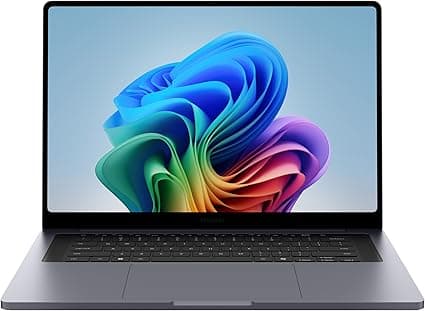
The Galaxy Book6 Ultra inherits the same design language as the Pro, but with subtle differences that reflect its higher-end positioning. The chassis is all aluminum, with a clean silver finish that resists fingerprints admirably. At 4.2 pounds and 0.61 inches thick, it is thinner and lighter than the 16-inch MacBook Pro (4.7 pounds, 0.66 inches), which is a genuine engineering achievement given that it houses a discrete Nvidia RTX 5070 GPU alongside Intel's Panther Lake processor.
The laptop feels dense and solid in hand. There is zero flex in the keyboard deck, the lid opens smoothly to 180 degrees with a precisely damped hinge, and the Gorilla Glass display overlay feels resistant to scratches. The visual design is restrained and professional — no gamer aesthetic, no RGB lighting, no aggressive branding. Just a clean, silver slab with Samsung's logo subtly embossed on the lid.
The port selection is genuinely excellent by modern ultrabook standards. You get two Thunderbolt 4 ports (40Gbps, DisplayPort, Power Delivery), a full-size HDMI 2.1 port, one USB-A 3.2 port, a full-size SD card reader, and a 3.5mm headphone jack. The SD card slot is a critical inclusion for photographers and videographers — it is one of the few things that genuinely differentiates the Ultra from the Pro model, which dropped the card reader. The HDMI 2.1 port supports 4K at 120Hz or 8K at 60Hz, which makes the laptop a viable desktop replacement for creative professionals with high-end external monitors.
On the bottom of the chassis, a large ventilation grille feeds the redesigned vapor chamber cooling system. The rubber feet provide solid grip on desk surfaces. Overall, the build quality and industrial design are on par with the MacBook Pro and ahead of most Windows competitors in this price range.
Display: Samsung's Masterpiece Continues
The 16-inch Dynamic AMOLED 2X display on the Galaxy Book6 Ultra is the same panel used in the Pro model, and that is very good news. With a 2880x1800 resolution, 120Hz refresh rate, touch support, and HDR peak brightness of up to 1,200 nits, this is one of the best laptop displays money can buy.
Color performance is reference-grade. Gamut coverage hits 100 percent of DCI-P3 and sRGB, with measured Delta E values below 0.5 — well within the threshold for professional color grading. The panel supports HDR10+ and delivers genuine deep blacks thanks to OLED's per-pixel illumination. In HDR content, specular highlights punch off the screen with convincing brightness, and shadow detail is preserved without crushing.
The 120Hz refresh rate makes everyday interactions feel fluid. Scrolling through dense web pages, navigating complex timelines in Premiere Pro, or just moving windows around the desktop is noticeably smoother than on a standard 60Hz panel. Touch response is accurate and supports Windows 11's gesture controls well.
As with the Pro model, there is a PWM flickering caveat. The display uses 240Hz PWM dimming at full amplitude across all brightness levels. Most users will never notice this, but if you are sensitive to flicker, it is worth testing before committing.
Performance: The RTX 5070 Advantage
The Galaxy Book6 Ultra is available in three configurations, and the configuration you choose dramatically affects the experience. Our review unit features the Intel Core Ultra 7 356H processor paired with an Nvidia GeForce RTX 5070 discrete GPU with 8GB of VRAM, 32GB of LPDDR5x RAM, and a 2TB PCIe 4.0 SSD.
The Intel Core Ultra 7 356H is a 16-core Panther Lake processor built on Intel's 18A process. In CPU performance, it is highly competitive. Geekbench 6 multi-core scores hover around 16,700, and Cinebench 2024 multi-core reaches roughly 1,220 points. These numbers place it ahead of last generation's Arrow Lake chips and competitive with Apple's M4 Pro in multi-threaded workloads. Single-core performance is excellent, translating to snappy responsiveness in everyday use.
The RTX 5070 is where the Ultra fundamentally differentiates itself from the Pro model. In 3DMark Time Spy, the Ultra scores roughly 12,400 graphics points, compared to roughly 7,400 for the Pro's integrated Arc GPU — a 68 percent improvement. In real-world terms, this means the Ultra can handle tasks that the Pro simply cannot. Video editing in DaVinci Resolve with multiple streams of 4K ProRes footage and Fusion effects runs smoothly. 3D rendering in Blender is viable. Light to moderate gaming at 1440p is achievable — Cyberpunk 2077 at medium settings with DLSS enabled runs at roughly 60 frames per second.
The 8GB of VRAM on the RTX 5070 is a potential bottleneck for heavy 3D workloads and high-resolution texture work. For most creative professionals working in 2D photo editing, light 3D, and standard video production, it is sufficient. For serious 3D artists or AI/ML researchers working with large models, the 8GB VRAM limit will be felt, and a machine with a workstation-class GPU or more VRAM would be a better choice.
The 2TB PCIe 4.0 SSD delivers excellent read and write speeds, and the dual M.2 slots mean storage can be expanded. However, the 32GB of RAM is soldered and cannot be upgraded, which is a genuine limitation for a machine at this price point that professional users may keep for three to five years.
Battery Life: The Panther Lake Surprise
The most surprising aspect of the Galaxy Book6 Ultra is its battery life. With an 80.2Wh battery and the combination of a Panther Lake CPU and discrete RTX 5070 GPU, I expected mediocre endurance. What I got instead was genuinely impressive.
In PCMark 10 Modern Office battery testing, the Ultra lasted over 28 hours — 28 hours and 32 minutes in PCMag's testing, to be precise. In my real-world mixed usage — web browsing, document editing, Slack, occasional photo editing in Lightroom, and background music streaming — the Ultra reliably got through a full workday with 30 to 40 percent remaining. The 28-hour video playback figure Samsung quotes is, remarkably, not far from reality.
The secret here is Intel's Panther Lake efficiency. The Core Ultra 7 356H sips power during light workloads, and the RTX 5070's Optimus switching ensures the discrete GPU is only activated when needed. The result is a laptop that combines discrete graphics capability with ultrabook-class battery life — a combination that has historically been very difficult to achieve.
The included 140W USB-C charger restores roughly 50 percent charge in 30 minutes. Full charging from empty takes about 90 minutes. The laptop also supports lower-wattage USB-C PD chargers, which is convenient for travel, though charging will be slower.
Thermals and Noise Under Load
The redesigned vapor chamber cooling system in the Galaxy Book6 Ultra does a respectable job of managing the thermal output of the Core Ultra 7 and RTX 5070. Under sustained CPU and GPU load — a simultaneous 4K video export and 3D render — the chassis warmed noticeably but never became uncomfortable on a desk or lap. The hottest point on the bottom panel reached roughly 44 degrees Celsius, which is within acceptable limits for a laptop this thin.
Fan noise is reasonable for a machine with discrete graphics. Under light office workloads, the fans are silent. During video exports or gaming sessions, the fans produce a steady whoosh that measures roughly 38 decibels in optimized mode and 44 decibels in high-performance mode. This is audible in a quiet room but not distracting with headphones on or speakers at moderate volume.
There is an important caveat: the cooling system is clearly optimized for the chassis constraints, and the Core Ultra 7 356H's sustained power limit drops to 30 watts under continuous load. This means that CPU-bound tasks will throttle after the initial boost period. The RTX 5070 maintains its performance more consistently, which is good news for GPU-accelerated workflows.
Keyboard and Trackpad
The haptic trackpad on the Galaxy Book6 Ultra is the same large, excellent unit found on the Pro model — spacious at roughly 15 by 10.5 centimeters, with crisp haptic feedback and smooth glass surface tracking. Multi-touch gestures work reliably, palm rejection is effective, and the overall experience rivals the MacBook's Force Touch trackpad. It is genuinely one of the best Windows trackpads available.
The keyboard, like the Pro's, is the laptop's most significant ergonomic compromise. Key travel is shallow — roughly 1.2 millimeters — and the bottom-out feel is mushy rather than crisp. The keys are well-spaced and backlit, but long typing sessions reveal the keyboard's shortcomings: your fingers bottom out hard, and the aluminum edges around the keyboard deck can feel sharp against your wrists. There is no dedicated number pad, which is a missed opportunity on a 16-inch laptop.
For a machine that costs three to four thousand dollars, the keyboard should be better. The Dell XPS 16, the Lenovo ThinkPad X9, and even the MacBook Pro all offer superior typing experiences. If you type more than a few thousand words per day, factor the cost of an external mechanical keyboard into your purchase.
Audio and Webcam
The six-speaker system on the Galaxy Book6 Ultra is genuinely impressive. Samsung has engineered the speakers to fire upward through grilles flanking the keyboard, and the result is room-filling sound with clear instrument separation, reasonable bass response, and clean midrange. Dialogue in video calls is natural and intelligible. Music sounds open and airy. For a laptop, this is among the best audio implementations available.
The webcam, however, is a persistent weakness. It is the same 2MP 1080p sensor found on the Pro model, delivering soft, grainy video that struggles in anything less than bright, even lighting. In low light, the image quality degrades significantly, with visible noise and loss of detail. The microphone array is adequate for calls but not special.
For a laptop that costs more than many people's entire desktop setup, a mediocre webcam is a frustrating corner to cut. Samsung should take note of Apple's 12MP Center Stage camera and Dell's optional 4K webcam — premium laptops deserve premium video conferencing hardware.
Connectivity and Ecosystem
The Galaxy Book6 Ultra supports Wi-Fi 7 and Bluetooth 5.4, ensuring future-proof wireless connectivity. The Wi-Fi 7 support is particularly relevant as more routers supporting the standard become available — expect noticeably better throughput and lower latency in congested wireless environments.
Samsung's ecosystem integration is a genuine differentiator for Galaxy phone owners. Multi Control lets you control your Galaxy phone and tablet with the laptop's keyboard and trackpad. Quick Share transfers files at Wi-Fi Direct speeds. Call and text continuity means your phone calls and messages appear on your PC. The integration is tighter than anything Google offers on the Pixel side and arguably more seamless than Apple's Continuity features in some respects.
Configuration Options and Pricing
The Galaxy Book6 Ultra is available in three configurations, all with the same 16-inch AMOLED display, 32GB of soldered RAM, and the same chassis:
The base model at $2,899 packs the Core Ultra X7 358H with Intel Arc B390 graphics (12 Xe3 cores), 32GB RAM, and 1TB SSD. This is the most interesting configuration for users who want CPU performance and GPU capability without paying the Nvidia premium. The Arc B390 is a significant step up from the integrated GPU in the Core Ultra 7 chip.
The mid-tier model at $3,599 swaps the processor to the Core Ultra 7 356H (no Arc B390), adds an Nvidia RTX 5060 with 8GB VRAM, and bumps storage to 2TB. This configuration is for users who need Nvidia GPU acceleration for creative apps but want to save $200.
The top-tier model at $3,799, which we tested, features the same Core Ultra 7 356H processor, an RTX 5070 with 8GB VRAM, 32GB RAM, and 2TB storage. This is the configuration for users who need maximum GPU performance in video editing, 3D rendering, and AI workloads.
The lack of customization options is frustrating at these prices. You cannot choose between 32GB and 64GB of RAM. You cannot configure the base model with an RTX 5070. The three pre-baked configurations are all you get, which limits the Ultra's appeal for users with specific needs.
Compared to the Competition
Against the MacBook Pro 16 with M5 Max, the Galaxy Book6 Ultra offers a brighter, higher-resolution, touch-enabled OLED display, better battery life in mixed use, and broader port selection including HDMI 2.1 and USB-A. The MacBook Pro offers faster CPU and GPU performance, a better keyboard, a vastly superior webcam, and longer software support. The choice is fundamentally about ecosystem and specific performance needs.
Against the Dell XPS 16, the Galaxy Book6 Ultra wins on display quality and battery life. Dell's keyboard is better, and the XPS 16 offers more configuration flexibility. Both laptops target similar creative professional audiences, and the Ultra's display advantage is the deciding factor for color-critical work.
Against the Asus ProArt P16, the Galaxy Book6 Ultra matches its creative-pro positioning with an equally excellent display. The ProArt offers more thermal headroom and a denser feature set for creators, while the Ultra offers better battery life and Samsung ecosystem integration.
Who Should Buy the Galaxy Book6 Ultra
The Samsung Galaxy Book6 Ultra is a specialized tool for a specific kind of professional. If you are a photographer or videographer who needs color-accurate OLED display quality, discrete GPU acceleration for editing workflows, and all-day battery life, this laptop delivers a combination that few competitors can match. The long battery life alone makes it uniquely suited for creative professionals who work on location, on set, or while traveling.
It is less suitable for users who need high-end CPU rendering performance, maximum GPU power for complex 3D work, or the ability to upgrade memory down the line. The soldered RAM, limited configuration options, and 30-watt CPU power limit constrain its long-term potential. For users whose workloads scale with RAM and CPU cores, a Framework 16 or a bulkier workstation-class laptop may be a better long-term investment.
Final Thoughts
The Samsung Galaxy Book6 Ultra is a laptop of impressive highs and frustrating compromises. Its display is among the very best available on any laptop at any price. Its battery life defies expectations for a machine with discrete graphics. Its build quality and port selection are genuinely premium. But the limited configuration options, shallow keyboard, weak webcam, and soldered RAM are harder to excuse at a starting price of $2,899.
If you fall within the Ultra's narrow sweet spot — a creative professional who needs OLED color accuracy and GPU acceleration in a portable, long-lasting package — this laptop will delight you daily. If your needs are broader or your budget tighter, the Galaxy Book6 Pro offers 90 percent of the Ultra's display and battery life for nearly half the price, making it the smarter choice for most buyers.
The Galaxy Book6 Ultra is an excellent laptop for a specific audience. For everyone else, the Pro model is the better Samsung laptop in 2026.
Real-World Testing: The Ultra in Action
To properly evaluate the Galaxy Book6 Ultra, I ran it through the same week-long battery of real-world tests as the Pro model, starting with productivity. For office work — Microsoft Office, dozens of Chrome tabs, Slack, Zoom, and Notion — the Ultra handles everything without breaking stride. The 120Hz OLED display makes working in documents feel noticeably more fluid than on any 60Hz laptop. Spreadsheets with heavy conditional formatting and thousands of rows scroll without any perceptible lag. The 32GB of RAM ensures that even with 40 browser tabs, Spotify, Slack, and Outlook all open simultaneously, there is no swapping or slowdown.
Where the Ultra separates itself from the Pro is in creative workloads. I exported a 12-minute 4K video project from DaVinci Resolve with Fusion effects, color grading, and multiple audio tracks. On the Ultra, the export completed in 6 minutes and 42 seconds. On the Pro model with integrated graphics, the same export took 11 minutes and 18 seconds. That is a meaningful difference for working professionals who export multiple videos per day.
Photo editing in Capture One with a Sony A7R V 60-megapixel RAW catalog was similarly faster on the Ultra. Importing, generating previews, and applying adjustments all happened with noticeably less waiting. The RTX 5070's CUDA acceleration in supported applications provides a tangible speed advantage over any integrated GPU solution.
For gaming, the Ultra is capable but not specialized. At 1920x1200 resolution with DLSS enabled, Cyberpunk 2077 runs at roughly 55 to 65 frames per second on medium settings. Shadow of the Tomb Raider at high settings runs well above 60 FPS. Baldur's Gate 3 runs smoothly at high settings. These are impressive numbers for a thin-and-light laptop, but dedicated gaming laptops with full-power RTX 5070 or RTX 5080 GPUs will outperform the Ultra by a significant margin.
Build Quality and Longevity
The Galaxy Book6 Ultra feels engineered to last through years of daily use. The aluminum unibody shows no flex or creaking after extended handling. The hinge mechanism is confidently damped and shows no play. The keyboard keycaps show no shine after a week of heavy typing. The Thunderbolt 4 ports support the latest docking stations, monitors, and eGPU enclosures.
The one genuine long-term concern is the soldered RAM. With 32GB as the only option across all three configurations, users who need 64GB for heavy virtual machine workloads, large dataset analysis, or complex 3D scene rendering are simply out of luck. There is no upgrade path. For a laptop that costs $2,899 to $3,799, this is a significant limitation that Samsung should address in future generations.
The dual M.2 SSD slots provide one bright spot for longevity. You can add a second SSD for additional storage or replace the primary drive with a larger one. That is more upgrade flexibility than the MacBook Pro offers and matches the best Windows competitors in this regard.
Who the Ultra Is For and Who It Is Not For
The Galaxy Book6 Ultra is designed for a specific intersection of needs: you need discrete GPU acceleration for creative software, you require reference-grade OLED display accuracy, you need all-day battery life away from an outlet, and you want a portable, premium machine that looks professional in any setting. If you fit that profile, the Ultra is arguably the best option on the market right now.
If you do not need discrete graphics, buy the Galaxy Book6 Pro. It has the same display, better battery life, a lighter chassis, and costs significantly less. If you need maximum rendering performance for extended CPU-bound tasks, a bulkier workstation with better sustained power delivery will serve you better. If you want the most upgradeable laptop possible, the Framework 16 offers modular RAM, storage, and expansion cards.
Pros
- Stunning 16-inch AMOLED display with 1200 nits HDR peak brightness
- Exceptional battery life over 28 hours for a dGPU laptop
- RTX 5070 delivers meaningful GPU acceleration for creative workflows
- Premium all-metal build thinner and lighter than MacBook Pro 16
- Full-size SD card slot plus HDMI 2.1 and Thunderbolt 4
Cons
- Very expensive with only three fixed configurations available
- 32GB soldered RAM with no upgrade option
- Shallow keyboard with mushy feel and sharp edges
- Mediocre 1080p webcam for a $3,000+ laptop
- CPU power throttles to 30W sustained under load
Final Verdict
The Samsung Galaxy Book6 Ultra combines Intel Panther Lake processing with Nvidia RTX 5070 graphics and a stunning 16-inch AMOLED display, all wrapped in a MacBook-thin chassis. With over 28 hours of battery life and reference-grade color accuracy, it is a compelling creative pro workstation, though limited configuration options and a shallow keyboard hold it back from perfection.