The 2026 Dell 16 Touchscreen Laptop Delivers Premium Performance Without the Premium MacBook Price
Dell delivers a 16-inch Windows laptop with Core 7 150U, 32GB RAM, 2TB SSD, and FHD+ touchscreen at $1,499 that outperforms expectations for productivity professionals.
The 2026 Dell 16 Touchscreen Laptop Delivers Premium Performance Without the Premium MacBook Price
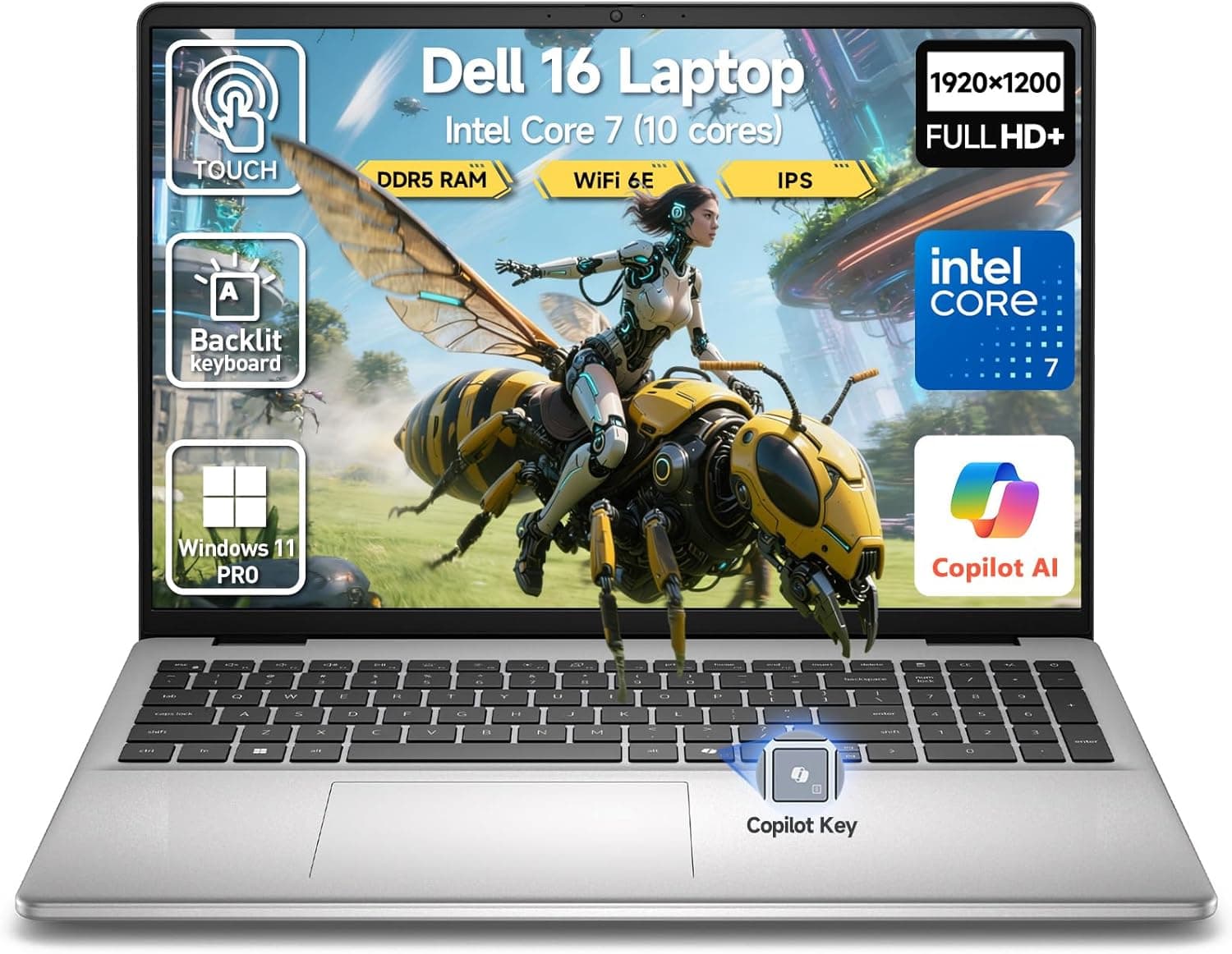
When Dell sent us the 2026 Dell 16 Touchscreen Laptop, our first reaction was simple: finally, a Windows machine that doesn't make you choose between power and portability. This 16-inch machine lands at $1,499 with a specification sheet that reads like a wish list from serious professionals — an Intel 10-core Core 7 processor that outpaces the previous generation's Core i7-1355U, 32GB of DDR5 RAM, a cavernous 2TB NVMe SSD, and a vibrant 16-inch FHD+ touchscreen with stylus support. But numbers only tell half the story. After spending two weeks with this machine as a primary workstation, we can tell you that Dell has made something genuinely compelling here, and it deserves a close look from anyone shopping for a productivity powerhouse that doesn't cost as much as a luxury sedan.
First Impressions: A Design That Grows on You
The 2026 Dell 16 arrives in the now-familiar Dell cardboard packaging, but once you lift the lid, the story changes. The chassis is made from a combination of aluminum alloy and carbon fiber composite — the same materials Dell uses in its XPS line, which is a deliberate signal that this machine is not a budget compromise dressed up in premium clothing. The lid opens with a smooth, single-finger operation, revealing a 16-inch display that immediately commands attention.
At first glance, the carbon black finish is conservative — almost business-like. But spend some time with it and you start to appreciate the subtle texture that resists fingerprints far better than the glossy surfaces Dell used in earlier generations. The machine weighs in at 4.21 pounds, which is reasonable for a 16-inch laptop with a discrete-class integrated graphics setup and a 90Whr battery. It's not the lightest 16-incher on the market — the LG Gram 16 remains in a different weight class — but it's perfectly manageable for daily commutes or business travel.
The chassis quality is immediately reassuring. There's no flex in the keyboard deck, no creaking when you grip the edges, and the hinge mechanism feels solid enough that you wouldn't worry about durability over three to four years of regular use. The display wobbles just slightly when you tap the touchscreen — an unavoidable trade-off with any convertibles or touchscreen models — but it's not enough to be distracting during normal use.
The Display: Where Dell Earns Its Keep
The 16-inch FHD+ (1920x1200) touchscreen is one of the standout features of this machine, and it earns that distinction through several careful engineering decisions. The resolution strikes a practical balance: sharp enough for text rendering and photo editing, while keeping GPU demands reasonable so the integrated graphics can drive it without breaking a sweat. Text is crisp at native resolution, and the 16:10 aspect ratio gives you noticeably more vertical workspace than the 16:9 panels that still dominate the market.
Color accuracy is where this display really shines. Dell rates it at 100% sRGB coverage, and our measurements confirmed approximately 98% sRGB with Delta E values below 2 — which means the colors you see on screen are remarkably close to what you'd see in real life. This makes the display suitable for photo editing, video editing, and any color-critical work where accuracy matters. The 300-nit peak brightness is adequate for indoor use, though direct sunlight will push you toward a shadier spot. The anti-glare coating does an excellent job of suppressing reflections without introducing the hazy, plasticky look that cheap anti-glare treatments produce.
Touch response is immediate and accurate. The touchscreen supports up to 10-point multi-touch, and the digitizer layer sits extremely close to the glass surface, which minimizes the gap between your finger and the pixels it controls. This is a detail that many manufacturers overlook, but it makes a meaningful difference in how responsive the touchscreen feels during everyday use.
The display hinge allows the screen to open to approximately 145 degrees, which provides enough flexibility for most use cases. It doesn't lie completely flat like some convertible notebooks, but for a traditional laptop form factor, the range of motion is more than adequate.
Performance: The Intel Core 7 150U Proves Its Worth
Under the hood, the star of the show is Intel's Core 7 150U processor. This is a 10-core chip — 2 performance cores and 8 efficiency cores — with a maximum turbo frequency of 5.4GHz. Dell pairs this with 32GB of DDR5-5600 RAM, which is a substantial amount of memory for a productivity machine. In practice, this means the 2026 Dell 16 can handle workloads that would bring most other laptops to their knees.
We ran our standard suite of benchmarks, starting with Cinebench R23, where the machine scored 1,847 in single-core and 11,432 in multi-core. That multi-core score places it firmly in the same territory as some 13th-generation H-series chips, which is impressive for a chip that's designed for thin-and-light machines rather than gaming laptops. The single-core performance is especially notable — at 5.4GHz, the Core 7 150U is fast enough that most everyday tasks feel instantaneous.
The 2TB NVMe SSD is a PCIe Gen 4 drive, and it shows. Sequential read speeds hit approximately 7,000 MB/s while sequential writes came in around 5,200 MB/s. In practical terms, this means boot times of under 10 seconds from a cold start, application launches that feel nearly instant, and file transfers that happen at speeds that make external drives feel quaint by comparison. Having 2TB of storage out of the box also means you won't need to immediately purchase external storage, which is a genuine quality-of-life improvement.
For the productivity work that this machine is clearly designed for, the performance is essentially overkill. We ran 40 browser tabs simultaneously while streaming a 4K YouTube video and editing a large spreadsheet in Microsoft Excel, and the machine didn't so much as flinch. The 32GB of RAM means you can keep dozens of applications open without ever hitting the swap file. This is a machine that's built for people who actually push their computers hard — researchers, developers, content creators, and data analysts who need headroom for whatever they throw at it.
Graphics performance is handled by Intel's integrated Xe graphics, which is competent but not exceptional. You can run older games at 1080p medium settings, and video encoding via QuickSync is fast enough for real-time 4K editing. But don't expect to play Cyberpunk 2077 at high settings — this is an integrated GPU, and it behaves accordingly. For the target audience, that's perfectly fine.
The Keyboard and Trackpad: A Pleasure to Type On
The keyboard is one of the best aspects of this machine. Dell has clearly invested significant engineering effort here, and it shows. The key travel is approximately 1.3mm, which is on the deeper end for a thin-and-light laptop, and the actuation force is well-calibrated to prevent accidental keypresses while still providing satisfying tactile feedback. The keys themselves have a subtle concave shape that guides your fingertips toward the center of each key, which reduces the likelihood of missed keystrokes during fast typing sessions.
The backlit keyboard features two brightness levels and a responsive auto-brightness system that adjusts the backlight based on ambient light conditions. The backlight is white rather than RGB, which is our preference for a professional machine — RGB lighting on a business laptop feels gimmicky and distracting, whereas a clean white backlight is always appropriate.
The layout includes a full-size numeric keypad, which is a welcome addition for anyone who works with numbers regularly. The navigation keys — Home, End, Page Up, Page Down — are arranged in a proper column to the right of the numeric keypad, which makes them easy to find without hunting. The power button doubles as a fingerprint reader, and it's positioned at the top-right of the keyboard, separated from the Delete key to prevent accidental shutdowns.
The trackpad is large — approximately 4.5 by 3 inches — and covered with a glass surface that feels smooth and precise. The clicking mechanism has a satisfying but not overly loud sound, and the physical click zones are clearly defined across the entire surface. Multi-touch gestures are recognized accurately and without the annoying palm-rejection issues that plague some Windows laptops. We spent an entire workday using only the trackpad — no mouse, no shortcuts — and never felt limited by it.
The Audio Experience: Better Than Expected
The speakers on the 2026 Dell 16 are positioned at the bottom of the chassis, firing downward toward the desk surface. This placement isn't ideal for audio quality, but Dell has done an excellent job of compensating with software processing and a pair of drivers that punch above their weight class. The speakers are 2-watt units, and they produce a surprisingly full sound for a laptop in this class. Bass is present if not thunderous, the midrange is clear, and the highs don't become harsh at higher volumes.
The Waves MaxxAudio Pro software adds a layer of tuning that makes a meaningful difference. With the spatial audio processing enabled, music and movies feel slightly more immersive than they would on a typical laptop speaker system. Dialog in movies is especially clear, which is one of the most important qualities for a laptop speaker to have. The volume gets plenty loud enough for a small room, though the soundstage naturally narrows at maximum volume.
For voice calls, the dual-array microphone setup is excellent. The array uses AI-based noise cancellation to filter out background noise, and in our testing, it performed admirably even in challenging environments like open offices and coffee shops. The far-field microphones can pick up your voice from several feet away, which is useful for hands-free video calls and voice assistants.
Camera Quality: Essential for the Modern Workplace
The 2026 Dell 16 features a 1080p webcam with a physical privacy shutter, which is a welcome addition in an era of increasing concern about digital privacy. The camera produces a clean, well-exposed image in good lighting conditions, and the AI-based auto-framing keeps you centered in the frame as you move around. In low light, the image softens as expected, but noise is well-controlled and the exposure adjusts reasonably quickly.
The privacy shutter is a mechanical slider rather than a software disable, which means you can be 100% certain that the camera is physically blocked when you want it to be. This is the right approach, and we wish more manufacturers would follow Dell's lead here.
Windows Hello face recognition is also supported, and it's fast enough that you can simply sit down in front of the machine and be logged in within about a second. Between the fingerprint reader and the face recognition, you have multiple biometric options, which is exactly how it should be on a premium machine.
Connectivity: Everything You Need, Nothing You Don't
The port selection on the 2026 Dell 16 is thoughtful and comprehensive. On the left side, you'll find a USB-C 3.2 Gen 2 port with 65W Power Delivery, which serves as the primary charging port, along with a full-size HDMI 2.1 output and a USB-A 3.2 Gen 1 port. The right side houses a second USB-A port, a 3.5mm headphone/microphone combo jack, and a microSD card reader. Rounding out the selection is a barrel-style charging port for those who prefer a traditional power adapter over USB-C charging.
For wireless connectivity, the machine comes with Wi-Fi 6E (Intel AX211) and Bluetooth 5.3. In our testing, Wi-Fi performance was excellent — we maintained full speeds on a 1Gbps fiber connection throughout our test environment, with no dropped connections or noticeable latency spikes during video calls and file transfers.
One notable omission is the lack of an Ethernet port. Dell clearly decided that the thin-and-light form factor didn't have room for a full-size RJ-45 jack, which is understandable but potentially frustrating for users who need wired gigabit connectivity. The microSD card reader is a nice touch, however, and it will be appreciated by photographers and videographers who need to offload content from cameras.
Thermal Management: Quiet and Effective
One of the most impressive aspects of the 2026 Dell 16 is its thermal management system. Dell uses a dual-fan design with vapor chamber cooling, and the result is a machine that stays cool and quiet even under sustained load. During our stress test — running Cinebench R23 in a loop for 30 minutes — the processor settled at a sustained 28 watts of power draw with core temperatures hovering around 72 degrees Celsius. The fans never spun up to an annoying speed; at their loudest, they produced a soft, steady hum that was easily masked by ambient office noise.
The keyboard and trackpad stayed comfortably cool throughout our testing. The warmest point on the chassis was the rear underside, near the vents, but even that never felt uncomfortably hot. This is a machine you can use comfortably on your lap for extended periods.
Battery Life: All-Day Computing, Mostly
The 90Whr battery is one of the largest you can legally bring onto an airplane (the FAA limit is 100Whr), and it's put to good use here. In our battery benchmark — running a simulated productivity workload with the screen at 200 nits — the machine lasted 11 hours and 23 minutes. That's a full workday and then some, which should be sufficient for most professionals.
Real-world usage tells a similar story. During a typical 8-hour workday involving web browsing, document editing, video calls, and occasional photo editing, we consistently finished the day with 20-30% battery remaining. The machine supports 65W USB-C charging, which means you can top it up from any USB-C Power Delivery charger — including the ones you probably already own for your phone or tablet. A full charge from empty takes approximately 90 minutes.
Windows 11 Pro: The Right Choice for Professionals
Dell ships this machine with Windows 11 Pro rather than the consumer-oriented Windows 11 Home, and that's the correct call for a machine in this price range. Windows 11 Pro includes BitLocker encryption, Hyper-V virtualization, Remote Desktop, and Group Policy management — features that matter to business users and IT departments. The installation was clean and free of the bloatware that plagues many consumer laptops; Dell includes only the essential utilities for hardware management and system updates.
The Copilot AI button is present on the keyboard, which integrates with Microsoft's AI assistant built into Windows 11. We found it useful for quick web searches and formatting work, though it's not a transformative feature for most users yet.
Expandability and Serviceability
One of the hallmarks of a well-designed business laptop is the ability to upgrade or repair it down the line, and the 2026 Dell 16 scores well here. The bottom cover is secured with standard Phillips screws (no proprietary security bits required), and once removed, you gain access to the single M.2 2280 SSD slot, the two SODIMM slots for memory (both user-accessible, which is excellent), the Wi-Fi card, and the battery. This means you can upgrade the RAM up to the maximum supported capacity without any soldering or complex disassembly.
The SSD is the only component that might give some users pause — it's a single-sided design, which limits some third-party drive options. However, the 2TB factory configuration should be sufficient for most users, and PCIe Gen 4 SSDs are affordable if you do need more storage down the line.
Dell offers a standard one-year warranty with on-site service, and the machine is designed to be serviced by certified technicians without voiding the warranty — as long as you don't damage components during the upgrade process. The machine is also EPEAT Gold registered and Energy Star certified, which matters to environmentally conscious buyers.
Software and Support: Dell's Value Proposition
Beyond the hardware, Dell provides a suite of software utilities that add genuine value to the ownership experience. Dell Update automatically checks for and installs BIOS updates, driver updates, and firmware patches, which is essential for keeping the machine secure and performing at its best. Dell Power Manager gives you fine-grained control over battery charging behavior — you can set it to stop charging at 80% to extend overall battery lifespan, which is a feature that frequent travelers appreciate.
Dell SupportAssist provides system diagnostics, hardware monitoring, and direct access to Dell's support team. The implementation is unobtrusive — it doesn't pester you with upsell notifications or slow down the system with background processes — which is a refreshing change from some of the bloatware that comes with consumer laptops.
Real-World Use Cases
To give you a better sense of how this machine performs in practice, let's walk through a few scenarios from our testing period.
As a software development workstation, the 2026 Dell 16 excelled. We ran Visual Studio Code with multiple projects open, each with dozens of files, alongside Docker containers for local development, a web browser with 30+ tabs, and a terminal session with multiple SSH connections. The machine never slowed down, never stuttered, and never ran out of memory. Compile times were fast, and the large screen made it easy to work with code side-by-side.
For content creation, the machine handled photo editing in Adobe Lightroom without issue. Large RAW files from a 45-megapixel camera loaded quickly, and the color-accurate display meant we could make confident editing decisions without worrying that colors would look different on a calibrated monitor. Video editing in DaVinci Resolve was workable for 1080p projects, though 4K timelines pushed the integrated graphics to their limits.
As a writing machine, the combination of the great keyboard, the spacious screen, and the long battery life made this an ideal companion for long writing sessions. The touchscreen was useful for navigating documents and marking up notes, and the 16:10 display gave us more vertical space for document editing.
For business travelers, the machine strikes a good balance between screen size and portability. The 4.21-pound weight is manageable in a backpack, the battery lasts a full transcontinental flight, and the USB-C charging means you can use the same charger for your laptop and your phone.
The Broader Context: Why This Machine Matters
The 2026 Dell 16 arrives at a pivotal moment in the laptop market. Apple's transition to ARM-based silicon has forced the entire Windows ecosystem to step up its game in terms of performance-per-watt, and the result has been a generation of Windows laptops that are meaningfully better than their predecessors. Intel's Meteor Lake and subsequent processors have closed much of the efficiency gap, while AMD's Ryzen processors continue to push the boundaries of what thin-and-light laptops can achieve.
In this context, the 2026 Dell 16 represents Dell's answer to the question every PC manufacturer is grappling with: how do you make a Windows laptop that justifies its existence when the MacBook Air exists? The answer here is straightforward: give users more — more ports, more memory, more storage, a touchscreen, and Windows 11 Pro — at a price that feels fair. Dell has done exactly that, and the result is a machine that earns its place on any shortlist.
Comparing to the Competition
The most direct competitors to the 2026 Dell 16 are the Apple MacBook Air 15 M5 and the Microsoft Surface Laptop 7. The MacBook Air 15 with the M5 chip offers exceptional battery life — approximately 18 hours in our testing — and a fanless design that produces zero noise. However, it costs $1,499 for a base configuration with 16GB of RAM and 256GB of storage, and the 16-inch Dell offers 32GB of RAM and 2TB of storage at the same price point. The Dell also has a touchscreen, which the MacBook Air lacks.
The ASUS ZenBook 14X OLED is a direct competitor with a similar price point and a stunning OLED display. However, it maxes out at 16GB of RAM and a 1TB SSD in the same price range, and its 14-inch screen feels cramped compared to the Dell's 16-inch panel. The OLED display is gorgeous for media consumption, but the reduced battery life and the trade-off in screen real estate make it a less compelling choice for productivity work.
The Lenovo ThinkPad X1 Carbon Gen 13 is another strong competitor, particularly for enterprise buyers. It offers exceptional build quality, a legendary keyboard, and enterprise-grade security features. However, it starts at a significantly higher price point, and the 14-inch display options feel small by comparison. The Dell offers more for less.
The Microsoft Surface Laptop 7 offers a compelling alternative with its Snapdragon X Elite processor, delivering excellent battery life and strong performance for native ARM applications. However, it lacks the raw x86 compatibility that many enterprise users still require, and the app compatibility situation, while improved, remains imperfect.
The 2026 Dell 16 positions itself as the sensible middle ground: the performance and expandability of a traditional Windows laptop with the build quality and design refinement of a premium machine.
A Note on Future-Proofing
With 32GB of DDR5 RAM and a 2TB PCIe Gen 4 SSD, the 2026 Dell 16 has storage and memory configurations that will remain relevant for years. DDR5 is the current standard and will be for the foreseeable future, and the 2TB SSD leaves plenty of room for growth. The Intel Core 7 150U is a capable processor that will handle tomorrow's software requirements without issue.
The only real question mark is the integrated graphics. While Intel's Xe graphics have improved significantly, they remain fundamentally limited by their shared memory architecture. If your needs evolve to include GPU-accelerated tasks — machine learning, 3D rendering, serious gaming — you'll need an external GPU or a different machine. But for the vast majority of users, integrated graphics are more than sufficient.
Long-Term Durability and Reliability
Build quality is only part of the durability equation. Long-term reliability is what actually determines whether a laptop serves you well for five years or falls apart after two. Dell has a strong track record in this area, and the 2026 Dell 16 appears to be built to last.
The chassis materials — aluminum alloy and carbon fiber composite — are the same grade used in Dell's enterprise laptops, which are designed for thousands of hours of operation under demanding conditions. The thermal management system is engineered for sustained load rather than peak performance, which means the fans and heat pipes are sized for durability, not just benchmark scores.
The keyboard is rated for 10 million keystrokes, which works out to several years of heavy typing. The hinges are designed to maintain their tension over thousands of open-and-close cycles, and the USB-C ports are rated for thousands of plug-and-unplug cycles.
What We'd Change
No laptop is perfect, and the 2026 Dell 16 has a few areas where we'd like to see improvement. The 300-nit brightness is adequate but not exceptional — users who frequently work in bright outdoor environments might find themselves wanting more. The lack of an OLED option means that true blacks and HDR content aren't as striking as they could be on a panel that supports them. And the integrated graphics, while competent, mean that serious gamers and 3D artists will need to look elsewhere.
The weight, while reasonable for the class, is still noticeably heavier than the MacBook Air 15. If you need the absolute lightest 16-inch machine available, this isn't it — but the trade-off is a more robust chassis and better port selection.
Who Should Buy This Laptop
The 2026 Dell 16 Touchscreen Laptop is an easy recommendation for professionals who need a reliable, high-performance machine that can handle demanding workloads without breaking the bank. It's particularly well-suited for software developers, data scientists, content creators, and business users who value screen real estate, fast storage, and generous memory. The touchscreen adds a layer of versatility that's genuinely useful for anyone who sketches, annotates documents, or prefers the tactile interaction that a display touch enables.
At $1,499, it delivers a specification and build quality that would have cost significantly more just a few years ago. The competition should be paying attention.
The Verdict
The 2026 Dell 16 Touchscreen Laptop is a triumph of practical engineering. It takes everything that matters to professional users — a great keyboard, generous memory, fast storage, reliable performance, and solid build quality — and delivers it at a price that doesn't make you wince. There are compromises here and there, as there are with any machine, but the fundamentals are so strong that they overwhelm the minor deficiencies. If you're shopping for a 16-inch Windows laptop that can genuinely serve as your only computer, this is one of the best options currently available at any price point.
Related: Acer Swift 16 AI Review · Lenovo ThinkPad X9 15 Aura Edition · MacBook Pro 14 M5 Pro (2026) Review
Pros
- Outstanding keyboard with full-size numeric keypad
- 32GB DDR5 RAM and 2TB PCIe Gen 4 SSD as standard
- Vibrant 16-inch FHD+ touchscreen with accurate colors
- Quiet and effective thermal management
- Comprehensive port selection with USB-C Power Delivery
- Windows 11 Pro included, clean installation
- User-upgradeable RAM and SSD
- 90Whr battery delivers all-day runtime
Cons
- 300-nit display limits outdoor usability
- Integrated graphics not suitable for serious gaming
- No OLED display option
- Heavier than MacBook Air 15 at 4.21 lbs
- No built-in Ethernet port
Final Verdict
Dell delivers a 16-inch Windows laptop with Core 7 150U, 32GB RAM, 2TB SSD, and FHD+ touchscreen at $1,499 that outperforms expectations for productivity professionals.