The Echo Show 21 Is the Smart Display Amazon Should Have Been Building All Along
Amazon's largest and most capable smart display combines a 21-inch Fire TV screen with comprehensive smart home control, improved video calling, and Alexa intelligence. At $349.99, it is premium but delivers the most complete smart display experience available.
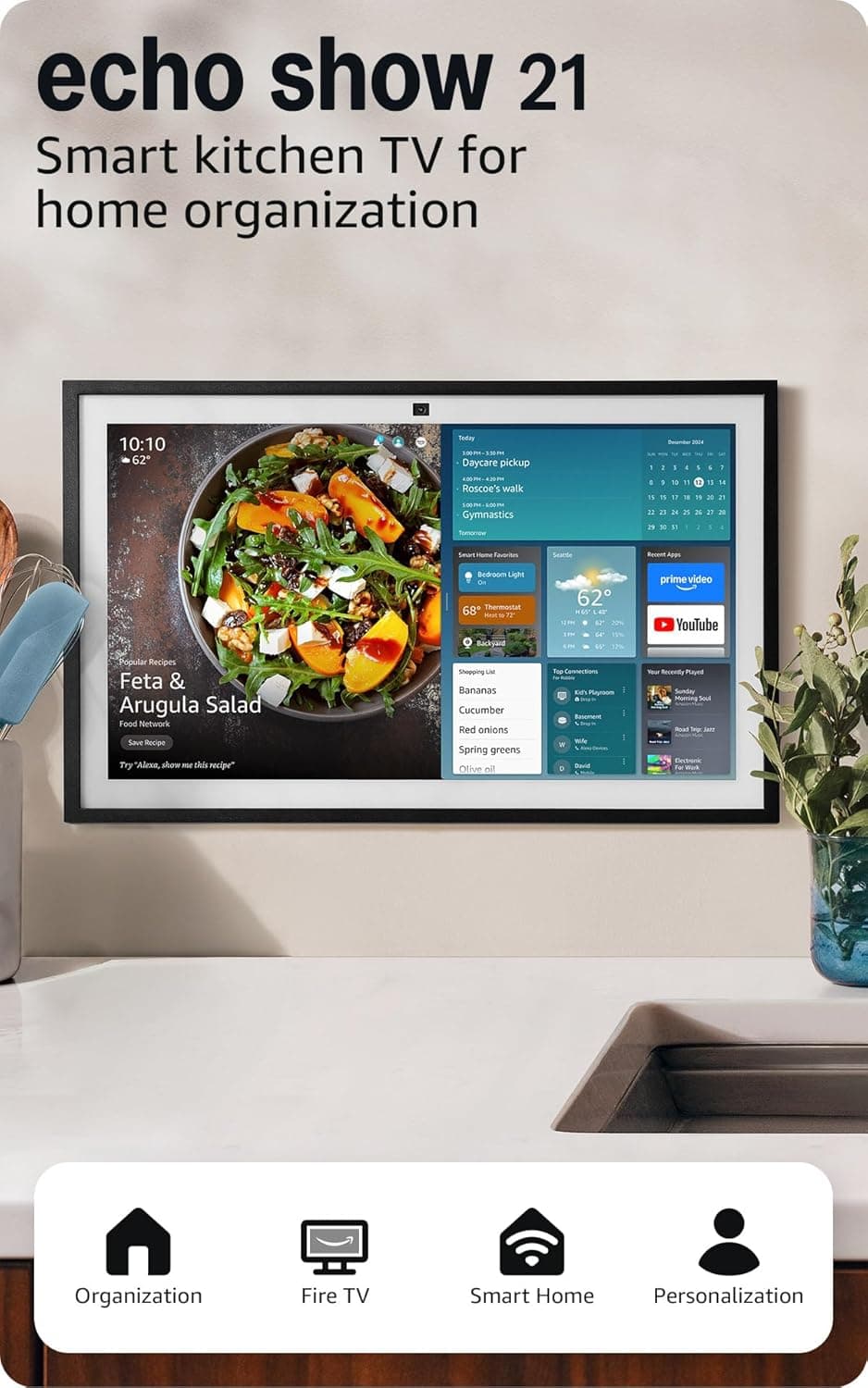
When Amazon first introduced the Echo Show lineup, the idea of a smart display felt like a novelty — a Alexa speaker with a screen, mostly useful for watching recipe videos while cooking. Years later, the category has evolved into something far more ambitious, and with the Echo Show 21, Amazon is making its most definitive statement yet: the smart display is not just a kitchen companion anymore. It is a full-fledged home hub, a portable television, a video calling station, a digital photo frame, and a smart home command center all rolled into one device that happens to be the largest smart display Amazon has ever produced.
The Echo Show 21 arrives with a 21-inch Full HD (1080p) touchscreen, built-in Fire TV functionality, an upgraded camera system with 3.3x digital zoom and a wide field of view, and a redesigned smart home dashboard that makes controlling compatible devices more intuitive than ever. At $349.99, it sits at the premium end of the Echo Show lineup, positioned above the Echo Show 15 and the newer Echo Show 10. The question is whether the larger screen and improved capabilities justify the price — and whether the Echo Show 21 represents a genuine step forward or simply more of the same with a bigger display.
This review takes an in-depth look at every aspect of the Echo Show 21, from its physical design and display quality to its Fire TV integration, Alexa capabilities, smart home control features, video calling performance, and how it compares to the competition. Whether you are considering upgrading from an older Echo Show or entering the category for the first time, this review will give you everything you need to decide if the Echo Show 21 deserves a place in your home.
Design and Hardware: Big and Bold with Purpose
The first thing you notice about the Echo Show 21 is its size. At 21 inches diagonally, it is substantially larger than the 10.1-inch Echo Show 10 and even bigger than the 15.6-inch Echo Show 15. Amazon has managed to increase the screen size without making the overall device feel unwieldy, though you will definitely want to plan for dedicated counter or wall space. The bezels are relatively thin — not tablet-thin, but unobtrusive enough that the screen feels immersive when you are watching content.
The stand is included in the box, and it provides a stable base that allows the Echo Show 21 to sit at a comfortable viewing angle on a kitchen counter or bedside table. Unlike some competitors that require additional purchases for basic accessories, Amazon includes the power adapter and stand, which is appreciated at this price point. The device itself has a fabric mesh finish on the back and sides, consistent with the design language of the Echo family, and it comes in Glacier White as the standard color option.
The display is a 1080p Full HD touchscreen with good brightness and decent viewing angles. It is not an OLED panel — no surprise at this price — but colors are vivid enough for watching Amazon Prime Video, Netflix, or YouTube content, and the resolution is sharp enough that text on the screen is easy to read from across the room. One notable improvement over previous Echo Show models is the reduced glare on the glass surface. Amazon has applied a matte-style coating that cuts down on reflections significantly, making the screen more usable in bright kitchen environments or near windows with direct sunlight.
The speaker system has been upgraded as well. The Echo Show 21 features dual speakers with improved bass response compared to its predecessors. For a device in this form factor, the audio quality is surprisingly competent — not replacing a dedicated soundbar or high-end Bluetooth speaker, but certainly adequate for watching television shows, listening to music while cooking, or taking video calls. The speakers get loud enough to fill a large kitchen or living room, and there is minimal distortion at higher volumes.
On the top of the device, you will find the physical controls: volume up and down buttons, a microphone mute toggle, and a camera shutter that physically covers the webcam for privacy. These physical controls are a welcome addition, giving you quick access to essential functions without needing to navigate the touchscreen or ask Alexa. The camera shutter is particularly important given the device's video calling capabilities, and it provides peace of mind for users concerned about unintended camera activation.
Display Performance: More Screen Real Estate Changes Everything
The 21-inch display on the Echo Show 21 is not just a larger version of what you get on smaller Echo Show models — it fundamentally changes how you interact with the device. With more screen space, Amazon has been able to redesign the home screen layout to show more information at once, including multiple widgets, weather forecasts, calendar events, and smart home device statuses without requiring you to scroll or ask Alexa for details.
The display serves two primary functions: as a Fire TV screen and as a smart home dashboard. As a Fire TV screen, the 21-inch panel is genuinely enjoyable to watch content on. Streaming Prime Video shows, movies, and television series looks good at this size, and the built-in Fire TV interface gives you access to thousands of apps including Netflix, YouTube, Apple TV+, Disney+, HBO Max, and more. The experience is not quite as premium as a dedicated 4K television, but for a kitchen display or a secondary screen in a bedroom, it is more than sufficient.
One of the standout features of the display is its ability to function as a digital photo frame when not in active use. The Echo Show 21 can display your Amazon Photos library in a slideshow mode, automatically curating your images and showing your favorite family moments. The auto-curation feature uses machine learning to select what it deems your best shots — a feature that has improved significantly over previous generations. The matte display coating makes these photos look more like printed prints than glossy reflections, which is a nice touch.
The touchscreen is responsive and accurate, supporting multi-touch gestures for navigating the Fire TV interface and scrolling through content. Navigating between apps, pausing and resuming video, adjusting volume, and browsing the smart home dashboard all feel smooth and immediate. There is a slight delay compared to a dedicated tablet or smartphone, but it is minimal and not disruptive to the overall experience.
For smart home control, the larger display means you can see more smart home devices at once on the dashboard. The redesigned smart home dashboard shows device groups (lights, thermostats, cameras, locks) with real-time status indicators, making it easy to see at a glance what is happening in your home. You can tap any device to control it directly — turning off lights, adjusting thermostat settings, viewing live camera feeds, or locking doors — all without needing to open a separate app on your phone.
Fire TV Integration: A Capable Television Replacement
The built-in Fire TV functionality is one of the Echo Show 21's most compelling features, and it has matured significantly since Amazon first introduced it on the Echo Show lineup. The Fire TV interface is snappy and well-organized, with clearly labeled rows for different content categories, personalized recommendations based on your viewing habits, and quick access to your most-used apps.
Content availability is extensive. With Fire TV, you have access to all major streaming services, including Amazon Prime Video, Netflix, YouTube, Apple TV+, Disney+, HBO Max, Hulu, Peacock, Paramount+, and many more. The Twitch app is also available for those who want to watch live streams. Most services require their own subscriptions, of course, but having them all accessible through a single interface on a device this size is genuinely convenient.
The included Fire TV remote is a significant improvement over earlier versions. It has a more ergonomic design, dedicated buttons for streaming app shortcuts, and a voice control button that lets you search for content using Alexa. The remote feels substantial and well-built, a far cry from the cheap clickers that shipped with early Fire TV devices. If you prefer not to use the touchscreen or voice commands, the remote provides a tactile alternative that works reliably.
For users who already have a Fire TV Stick or Fire TV Cube elsewhere in their home, the Echo Show 21 offers a compelling reason to consolidate. Instead of having a separate streaming device and a smart display, you get both in one package. The transition between content — say, switching from a recipe display to watching a cooking show to checking your smart doorbell camera — is seamless and does not require reaching for a different remote or asking Alexa to change inputs.
One thing to note is that the Echo Show 21 does not support 4K streaming. It maxes out at 1080p Full HD. For many users, this will not be a significant limitation — the majority of streaming content is still delivered in 1080p, and the device is primarily designed for kitchen or secondary room use rather than as a primary home theater display. However, if you are expecting 4K support at this price point, you will be disappointed. Amazon clearly made the choice to prioritize the smart display and Fire TV integration over raw resolution.
Alexa and Voice Control: Still the Brain of the Operation
Alexa remains the core of the Echo Show 21 experience, and Amazon has continued to refine the voice assistant with each generation. On the Echo Show 21, Alexa responds quickly and accurately to voice commands, and the far-field microphone array does an excellent job of picking up your voice even in noisy kitchen environments with blenders, stovetops, and conversation all happening simultaneously.
The voice control capabilities extend to virtually every aspect of the device. You can ask Alexa to play specific shows or movies on Fire TV, display recipe videos from sources like AllRecipes or Food Network, set timers and alarms (with multiple concurrent timers supported), check the weather, read your calendar, play music from Amazon Music, Spotify, Apple Music, or Pandora, control smart home devices, make video calls, and much more. The breadth of Alexa's functionality on the Echo Show 21 is impressive, and the voice interface remains one of the most natural and frictionless ways to interact with a smart home device.
One particularly useful feature on the Echo Show 21 is Active Media, which allows you to start playing music in one room and seamlessly add additional Echo devices in other rooms to create a multi-room audio experience. If you start playing a song in the kitchen and decide you want the same music in the bedroom and living room, you can simply ask Alexa to add those rooms to the current playback session. This is a small quality-of-life improvement that makes the Echo Show 21 more enjoyable as a music device.
The display also adds a visual layer to Alexa interactions that previous voice-only Echo devices lacked. When you ask Alexa for a recipe, you get step-by-step visual instructions alongside voice guidance. When you ask about the weather, you see a visual forecast with hourly conditions. When you set a timer, you see a countdown on the screen. This combination of voice and visual feedback makes the Echo Show 21 more informative and easier to use than a voice-only device, particularly for complex tasks that benefit from seeing information laid out rather than trying to remember spoken instructions.
Amazon has also improved Alexa's contextual understanding on the Echo Show 21. The assistant can now handle more natural, conversational queries without requiring you to phrase commands in specific ways. You can ask follow-up questions and the system generally tracks the conversation context correctly, though it still occasionally stumbles with very complex multi-step requests.
Smart Home Control: The Command Center Your Home Needs
For users invested in the smart home ecosystem, the Echo Show 21 functions as an exceptionally capable command center. The redesigned smart home dashboard takes full advantage of the larger screen, displaying device groups and individual devices with real-time status information that you can see at a glance from across the room.
The dashboard supports all major smart home protocols, including Zigbee, Matter, and Thread, which means it can communicate with a wide range of devices from different manufacturers without requiring separate hubs or bridges. This is particularly valuable because it reduces the number of dedicated hub devices you need cluttering your home — instead of having a separate Philips Hue bridge, a SmartThings hub, and an Amazon Echo device, the Echo Show 21 can serve as a central controller for multiple ecosystems simultaneously.
Controlling devices through the touchscreen interface is straightforward and intuitive. Tapping on a light group lets you adjust brightness and color temperature for smart bulbs. Tapping on a thermostat shows the current temperature and lets you adjust the target temperature with a slider. Tapping on a camera feed opens a live view from your security cameras. The experience is fast and responsive, and the large screen makes it easy to see exactly what you are controlling.
Voice control extends to smart home devices as well, of course. You can ask Alexa to turn off all the lights in the house with a single command, set specific scenes like Movie Mode or Morning Routine that activate multiple devices simultaneously, or query the status of individual devices. The combination of voice and touchscreen control gives you flexibility in how you interact with your smart home — voice for quick commands when your hands are full, and the touchscreen for more detailed control when you need it.
One area where the Echo Show 21 particularly excels is in displaying live camera feeds. If you have compatible smart doorbells, security cameras, or video intercoms, you can view their feeds directly on the Echo Show 21's large screen. The 21-inch display is particularly well-suited for this use case, giving you a clear, detailed view of who is at your door or what is happening in your backyard. For households with multiple cameras, the dashboard provides quick thumbnail previews of all camera feeds, and tapping any thumbnail expands it to full screen.
Video Calling: Better Than Ever for Staying Connected
The camera system on the Echo Show 21 has received a meaningful upgrade over previous generations, featuring a wide field of view and 3.3x digital zoom. This makes it considerably more versatile for video calls than earlier Echo Show models, which had fixed-field-of-view cameras that either showed too little of the room or required you to stand uncomfortably close to the device to be in frame.
The wide field of view means you can make video calls from a normal seated position at a kitchen table or living room sofa without feeling like the camera is too close. The 3.3x zoom gives you flexibility to zoom in when you want a tighter shot — useful for showing something specific to the person you are calling or for getting a closer view when the room is busy. In practice, the zoom is digital rather than optical, so image quality degrades as you zoom in, but having the option is valuable for situational flexibility.
Amazon has also improved the noise-canceling microphones on the Echo Show 21, and the difference is noticeable in real-world use. During video calls, your voice comes through clearly even when there is background noise like a running dishwasher or television. The person on the other end of the call should be able to hear you clearly in most typical household environments, which is exactly what you want from a video calling device.
The Echo Show 21 supports drop-in calls to other Echo devices and the Alexa app, as well as standard voice calls through Alexa. You can also make video calls to other Echo Show devices, the Alexa app on smartphones, and (with some limitations) to Skype and Zoom contacts. The broader compatibility with third-party calling services makes the Echo Show 21 more versatile than devices that only support proprietary calling systems.
For families spread across different households, the Echo Show 21 is an excellent way to stay in touch. The large screen makes faces feel more present and lifelike than on a smaller display, and the hands-free operation means you can move around the room while talking without worrying about staying in the camera frame. It is not a replacement for in-person visits, but it is one of the most natural and low-friction ways to have video conversations with family members who might not be comfortable with smartphones or computers.
Comparison to Previous Echo Show Models and the Competition
The Echo Show 21 sits at the top of Amazon's smart display lineup, and it is worth comparing it to the models it replaces or sits alongside. The most direct predecessor is the Echo Show 15, which features a 15.6-inch display and a similar feature set. The Echo Show 21 offers a meaningfully larger screen — 21 inches versus 15.6 inches — along with improved speakers, a better camera system, and the latest version of the smart home dashboard. If you have counter or wall space for the larger model, the upgrade is justified by the improved viewing experience alone.
The Echo Show 10, which features a rotating display that follows you around the room, occupies a different niche. For users who prioritize the auto-rotating feature — useful if you move around the kitchen while cooking — the Echo Show 10 remains a compelling option. However, the Echo Show 21's larger screen and improved overall feature set make it the better choice for most users who do not specifically need the rotating display.
Compared to the Google Nest Hub Max, the Echo Show 21 offers a larger display and deeper Fire TV integration. The Nest Hub Max has a 10-inch screen and Google Assistant instead of Alexa, along with more limited streaming app support through Chromecast. If you are invested in the Google ecosystem, the Nest Hub Max might be a better fit, but for Amazon ecosystem users, the Echo Show 21 is the superior choice.
The Echo Show 21 also compares favorably to dedicated smart displays from smaller manufacturers. Its combination of screen size, Fire TV integration, Alexa capabilities, smart home protocol support, and camera system is difficult to match at this price point. No other manufacturer offers a smart display with this breadth of functionality, and the 21-inch screen size puts it in a category practically of its own for household smart displays.
The Larger Ecosystem: Where the Echo Show 21 Fits
Understanding where the Echo Show 21 fits in your home ecosystem is important before making a purchase decision. This device is best suited for a primary kitchen location, a large bedroom, a living room where you want streaming capability without a dedicated television, or a home office where you want easy access to video calls and smart home controls during the workday.
It is not ideal as a primary home theater display — the lack of 4K support and the speaker system, while competent, do not match the quality of a dedicated television and sound system. For watching movies and television as your primary viewing activity, you will still want a proper TV setup. But as a secondary display for casual viewing, recipe following, news watching, and smart home monitoring, the Echo Show 21 is excellent.
The device also works best when you already have other Alexa-compatible devices in your home. If you are starting from scratch with smart home equipment, the Echo Show 21 can serve as a hub, but you will need to budget for the devices themselves. If you already have smart lights, a smart thermostat, a Ring doorbell, or other compatible devices, the Echo Show 21 immediately becomes more valuable as a central control point.
Amazon has positioned the Echo Show 21 as the centerpiece of its Alexa and Fire TV ecosystems, and that positioning is accurate. It is the most capable and versatile Echo device Amazon has ever made, and while the price reflects the premium positioning, the functionality on offer justifies the cost for users who will take advantage of its full range of capabilities.
Connectivity and Privacy: What You Need to Know
The Echo Show 21 connects to your home network via dual-band Wi-Fi, supporting both 2.4GHz and 5GHz networks. Setup is straightforward through the Alexa app, and once connected, the device stays reliably connected without frequent dropouts or connectivity issues. The Wi-Fi performance is solid, and streaming content over Wi-Fi is smooth even at high quality settings.
On the privacy front, Amazon has made incremental improvements with each Echo Show generation. The physical camera shutter is the most important addition — it physically blocks the camera lens, eliminating any concern about unintended video capture. The microphone mute button provides similar peace of mind for audio. You can also view and delete your voice recordings through the Alexa app, and you can configure the device to not retain recordings beyond a certain period.
Amazon's Alexa privacy controls have expanded over the years, and you now have granular control over what data the device collects and how it is used. You can opt out of certain data-sharing practices, review the permissions you have granted to skills and third-party integrations, and manage advertising preferences. The default settings are reasonable for most users, but privacy-conscious users will appreciate the level of control available.
One thing to note is that the Echo Show 21 does include Amazon's AZ1 Neural Edge processor, which handles some voice processing locally rather than sending everything to the cloud. This improves response times for certain voice commands and reduces the amount of audio data that needs to be transmitted to Amazon's servers. While the device is not fully offline-capable (many features require cloud connectivity), the local processing component is a step in the right direction for privacy-conscious users.
The Verdict on the Echo Show 21
After spending extended time with the Echo Show 21, several things become clear. First, Amazon has built the most complete smart display on the market — a device that successfully combines a large-screen Fire TV experience, a powerful voice assistant, a versatile smart home controller, and a high-quality video calling station in a single package. Second, the 21-inch screen is not just a gimmick — it genuinely improves the experience of using every feature on the device, from watching content to controlling smart home devices to making video calls.
The price of $349.99 is not trivial, and it places the Echo Show 21 in a premium category. For users who will use it primarily as a kitchen timer and occasional recipe display, cheaper alternatives like the Echo Show 5 or Echo Show 8 will be more appropriate. But for users who want the full smart display experience — with Fire TV streaming, comprehensive smart home control, video calling, and a display that can serve as a digital photo frame — the Echo Show 21 delivers in a way that smaller devices simply cannot match.
Amazon has iterated on the Echo Show concept for years, and the Echo Show 21 feels like the culmination of that evolution. Every feature works reliably, the integration between voice, touchscreen, and smart home control is seamless, and the larger display genuinely adds value rather than just being a spec bump. If you are looking for the best smart display Amazon makes — and arguably the best smart display available from any manufacturer — the Echo Show 21 is the device to get.
The question of whether it is worth upgrading from an older Echo Show model depends on your specific situation. If you have an Echo Show 10 or Echo Show 15, the improvements are meaningful but incremental, and the upgrade may not be urgent. If you have an older model like the Echo Show 5 or Echo Show 8, or if you are buying your first smart display, the Echo Show 21 represents a significant step forward and is easy to recommend. It is a device that earns its place in the home through daily utility rather than novelty — and in that sense, it represents the Echo Show concept finally reaching its full potential.
Related: Google TV Streamer 4K Review · Meta Quest 3S Review · Roborock Saros Z70 Review
Pros
- Massive 21-inch 1080p touchscreen provides immersive content consumption and smart home control
- Built-in Fire TV with full streaming app support eliminates need for separate streaming device
- Physical camera shutter and microphone mute button for privacy peace of mind
- Redesigned smart home dashboard with Matter/Thread/Zigbee support
- Improved camera system with wide field of view and 3.3x digital zoom for video calls
- Excellent far-field microphones that work reliably in noisy environments
- Includes stand and remote control — no additional accessories needed
Cons
- No 4K streaming support limits future-proofing appeal
- Premium price at $349.99 may be excessive for basic kitchen display use
- Lacks rotating display of Echo Show 10 for room-following functionality
- Screen glare can still be an issue in very bright direct sunlight
Final Verdict
Amazon's largest and most capable smart display combines a 21-inch Fire TV screen with comprehensive smart home control, improved video calling, and Alexa intelligence. At $349.99, it is premium but delivers the most complete smart display experience available.