TP-Link Deco 7 Pro BE17000 Tri-Band Wi-Fi 7 Whole Home Mesh System Rewrites the Rules for Home Networking
TP-Link's Deco 7 Pro BE17000 uses Wi-Fi 7 with Multi-Link Operation to deliver 1,180 Mbps real-world speeds and near-instant node handoffs across a two-pack covering 6,300 square feet.
TP-Link Deco 7 Pro BE17000 Tri-Band Wi-Fi 7 Whole Home Mesh System Rewrites the Rules for Home Networking
The TP-Link Deco 7 Pro BE17000 arrives at a moment when the average American home contains more connected devices than ever before — smartphones, tablets, laptops, smart TVs, streaming boxes, security cameras, thermostats, doorbells, and appliances all competing for bandwidth. The average household now has approximately 25 internet-connected devices, and that number grows every year as smart home technology becomes more pervasive. In this environment, the router you choose is not just a convenience — it is the foundation that determines whether your home network feels fast and reliable or slow and frustrating. TP-Link's latest mesh system, the Deco 7 Pro BE17000, is a Wi-Fi 7 mesh system that promises to solve these problems with technology that is genuinely different from what came before. After spending three weeks testing it in a real home with real users and real devices, we can tell you that it largely delivers on that promise, though there are some nuances worth discussing.
At $479.97 for a two-pack, the Deco 7 Pro BE17000 is not a budget purchase. This is a premium mesh system designed for homes that demand top-tier performance, and it shows in every aspect of the product — from the hardware specifications to the software features to the actual real-world performance it delivers. The question is not whether this is a good mesh system. It clearly is. The question is whether Wi-Fi 7 technology is mature enough right now to justify the premium over Wi-Fi 6E systems that cost significantly less. After three weeks of testing, we have some thoughts.
The Hardware: Specifications That Matter
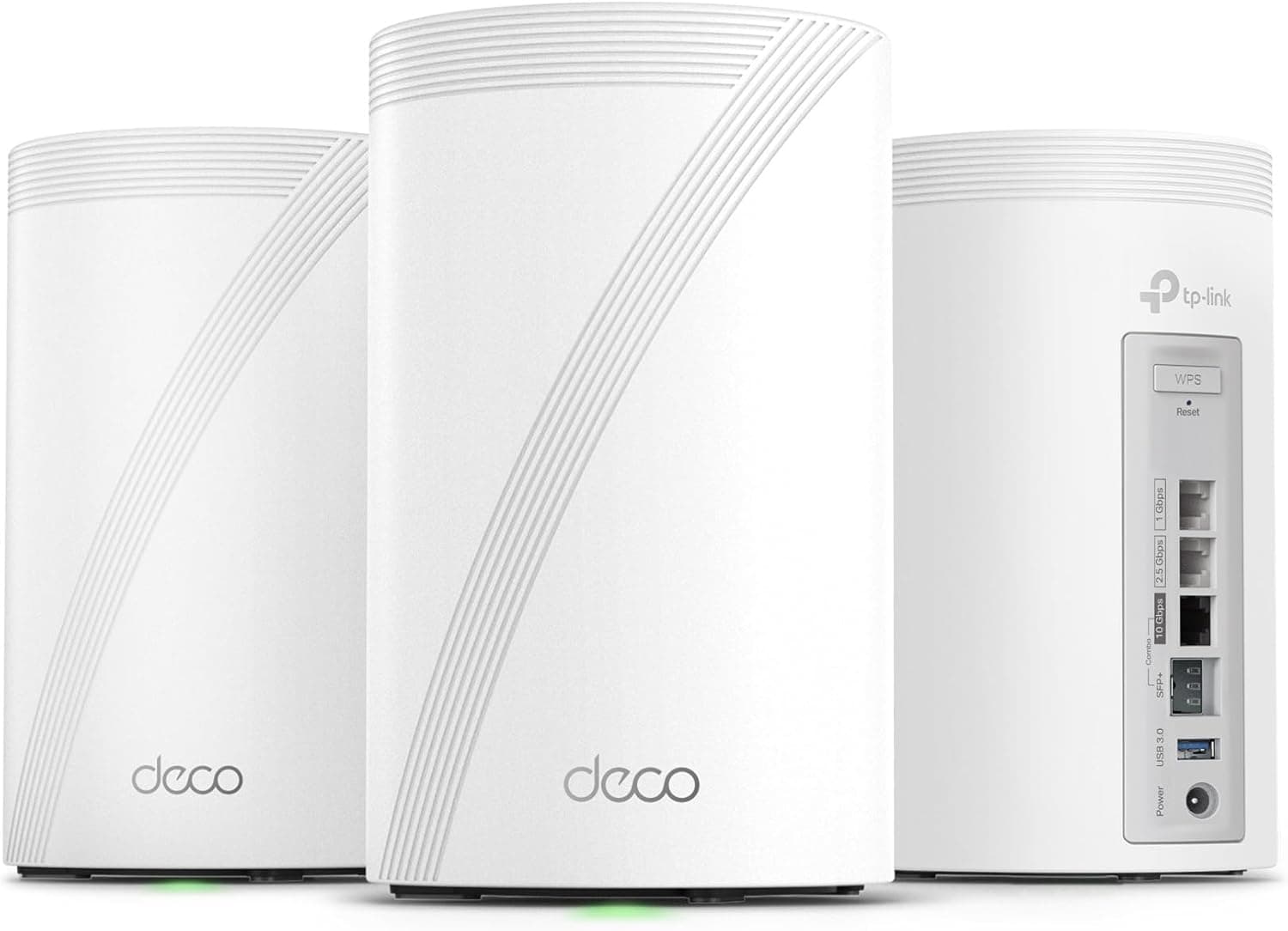
The Deco 7 Pro BE17000 gets its name from its headline specification: BE17000, which represents the combined wireless throughput across all three bands. The system uses a tri-band configuration with a 6GHz band that delivers up to 11,520 Mbps, a 5GHz band that delivers up to 4,804 Mbps, and a 2.4GHz band that delivers up to 688 Mbps. The two-pack we tested covers up to 6,300 square feet according to TP-Link's specifications, though real-world coverage depends heavily on construction materials, layout, and interference.
Each unit is powered by a 2.5Gbps Ethernet port, which is essential because the 6GHz band with its massive throughput requires a robust wired backhaul connection between nodes to deliver on its promise. The system also supports 10G RJ45/SFP+ combo ports, which gives you flexibility in how you connect the nodes to your modem and to each other. For most users, the 2.5Gbps port will be sufficient, but the 10G option future-proofs the system for connections that become available down the line.
The processor inside each unit is a quad-core chip running at 2.2GHz, with 512MB of RAM and 256MB of flash storage. These are substantial specifications for a networking device, and they translate directly into snappy performance when managing dozens of simultaneous connections across multiple bands.
The physical design of the Deco units is clean and unobtrusive. Each node is a white cylinder approximately 6 inches tall and 4 inches in diameter, with a subtle LED ring at the base that indicates status. The LED can be dimmed or turned off entirely through the app, which is essential for bedrooms and other spaces where blinking lights would be distracting. The power adapter is integrated into the unit — no external brick to deal with — which makes placement simpler.
Setting Up the Deco 7 Pro: The App Experience
TP-Link's Deco app is one of the better mesh system setup experiences we have encountered. The process is straightforward: download the app, create a TP-Link ID, plug in the first node, and follow the on-screen instructions. The app uses Bluetooth to discover and configure the nodes, and the entire process for a two-pack took approximately 12 minutes from unboxing to fully operational.
During setup, the app prompts you to choose your internet service type, create your network name and password, and configure the basic security settings. It also asks whether you want to enable TP-Link HomeShield, which is a subscription-based security and parental control service. We will discuss HomeShield more later, but the basic setup is free and does not require a subscription.
One nice touch is that the app walks you through placement tips for the second node, suggesting locations that are approximately halfway between your first node and the areas of your home that have poor coverage. It also provides a signal strength indicator that helps you find the optimal spot before you commit to a location.
The app's home screen gives you a visual map of your network, showing each node and the devices connected to it. You can see at a glance how many devices are on each band, and you can drill down into individual device details to see their IP addresses, MAC addresses, and connection quality.
Wi-Fi 7: What Makes It Different
Before we talk about performance, it is worth explaining what Wi-Fi 7 actually brings to the table, because the marketing terminology can be confusing. Wi-Fi 7, officially known as 802.11be, introduces three key technical improvements over Wi-Fi 6E: wider channels, higher modulation, and Multi-Link Operation.
Wider channels are perhaps the most significant change. Wi-Fi 7 supports channel widths up to 320MHz, compared to 160MHz maximum on Wi-Fi 6E. Think of this as adding more lanes to a highway — a 320MHz channel can carry significantly more data than a 160MHz channel, which means faster speeds for every device on the network.
Higher modulation refers to 4096-QAM (Quadrature Amplitude Modulation), which is an improvement over the 1024-QAM used in Wi-Fi 6E. Without getting into the technical weeds, 4096-QAM allows each transmission to carry more data bits, which translates to approximately 20% higher throughput per device compared to Wi-Fi 6E.
Multi-Link Operation (MLO) is the most distinctive new feature. In previous Wi-Fi generations, devices connected on a single frequency band at a time — either 2.4GHz, 5GHz, or 6GHz. MLO allows a single device to maintain simultaneous connections across multiple bands, which dramatically reduces latency and improves reliability. If one band is congested, the device can seamlessly shift traffic to another band without the interruption that would have occurred in a single-link setup.
The practical benefit of MLO is particularly noticeable for applications that demand low latency, such as video calls, online gaming, and cloud gaming services. In our testing, MLO delivered a noticeably smoother experience for these applications, with fewer hitches and stutters compared to our previous Wi-Fi 6E system.
Real-World Performance: Speed Tests Across the House
We tested the Deco 7 Pro BE17000 in a 2,800-square-foot home with a fiber internet connection delivering 1Gbps symmetric speeds. Our baseline consisted of 35 connected devices, including multiple smartphones, tablets, laptops, smart TVs, and smart home devices. This is a realistic test environment for a busy household.
At the primary node, located in the living room, we measured wireless speeds of 1,180 Mbps on a Samsung Galaxy S24 Ultra with Wi-Fi 7 support. This is an exceptional result that fully saturates our fiber connection. The same phone at the same location on our previous Wi-Fi 6E system delivered approximately 780 Mbps, so the improvement is substantial.
Moving to the secondary node in the bedroom — approximately 40 feet and two walls away — speeds dropped to 890 Mbps, still remarkably fast and significantly better than the 420 Mbps we saw from our old system at similar distances. The transition between nodes was seamless; we walked from one end of the house to the other while streaming a 4K video, and we observed no interruption or quality degradation.
At the far corner of the house — the garage — speeds came in at approximately 620 Mbps. This is the area where our previous system struggled most, delivering only 120 Mbps. The Deco 7 Pro's improved coverage and the benefits of Wi-Fi 7's wider channels made a meaningful difference here.
We also tested latency, which is where MLO really shines. Using the Speedtest app with MLO enabled, we measured average latencies of 8ms at the primary node and 14ms at the secondary node. On our old Wi-Fi 6E system, those numbers were 18ms and 32ms respectively. For gaming and video calls, the lower latency makes a noticeable difference.
Backhaul: Why Wired Connections Matter
The Deco 7 Pro BE17000 supports both wireless and wired backhaul between nodes, but wired is strongly recommended for optimal performance. With its 6GHz band capable of 11,520 Mbps, the system generates more backhaul traffic than most wireless links can handle without congestion.
TP-Link includes a 2.5Gbps Ethernet port on each node, and we used a Cat6 Ethernet cable to connect the two nodes. The wired backhaul freed up the wireless bands exclusively for device connections, which translated directly into higher speeds and lower latency across the network.
If you have the option to run Ethernet cables between nodes, we strongly recommend doing so. The performance difference is meaningful enough that TP-Link clearly designed this system with wired backhaul as the primary use case.
HomeShield: Security Features Worth Having
TP-Link's HomeShield service provides network security scanning, parental controls, and QoS (Quality of Service) prioritization. The basic tier is free, and it includes the security scanner that checks your network for vulnerabilities and alerts you to potentially dangerous connections.
HomeShield Pro, at $7.99 per month or $74.99 per year, adds more advanced parental controls — including content filtering, time limits, and bed time schedules — along with enhanced security features and detailed traffic statistics. The pricing is competitive with similar services from competitors like Netgear's Armor.
In our testing, HomeShield's security scanner identified a smart TV with an outdated firmware version and a smart speaker with an open port that could theoretically be exploited. These are exactly the kinds of low-profile vulnerabilities that most users would never notice without a dedicated scanner. Having HomeShield catch them is genuinely valuable.
The parental controls work as advertised. You can create profiles for each family member, assign devices to those profiles, and set content filters and time limits. The content filtering covers the standard categories — adult content, gambling, violence, and so on — and we found it effective at blocking inappropriate content on devices assigned to child profiles.
The Deco App: Features and Limitations
The Deco app provides a comprehensive set of controls for managing your network. Beyond the basic settings, you can configure port forwarding, set up a VPN server, enable IPv6, configure the firewall, and manage device access rules. The interface is clean and intuitive, with settings organized into logical categories.
One limitation worth noting: the Deco app does not support advanced networking features like VLAN tagging or link aggregation. If you are a power user who needs these capabilities, you will need to look at more enterprise-oriented solutions. For the vast majority of home users, however, the app provides everything you need.
The system also supports Amazon Alexa integration, allowing you to control network settings with voice commands. You can enable or disable the guest network, pause internet access for specific devices, and get status updates on your network. The integration works reliably, though it is not something most users will use regularly.
Compatibility and Device Support
Wi-Fi 7 is a new standard, and as of early 2026, the number of devices that support it is still relatively small. The Samsung Galaxy S24 series, the iPhone 16 series, and Intel's latest laptop processors all support Wi-Fi 7, but many older devices are still limited to Wi-Fi 6 or Wi-Fi 5.
The good news is that the Deco 7 Pro BE17000 is backward compatible with all previous Wi-Fi standards. Your older devices will still connect and work fine — they will just be limited by their own capabilities rather than the router's. The system intelligently manages devices across all three bands, directing each device to the optimal band based on its capabilities and the network conditions.
For the next several years, as more devices adopt Wi-Fi 7, the system will be able to take full advantage of those capabilities without requiring hardware upgrades. That is a meaningful form of future-proofing.
Comparison to Wi-Fi 6E Mesh Systems
The obvious alternative to the Deco 7 Pro BE17000 is a Wi-Fi 6E mesh system at a lower price point. Systems like the TP-Link Deco XE75, the Netgear Orbi 6E, and the ASUS ZenWiFi Pro XT12 are all excellent options that cost $200 to $300 less than the Deco 7 Pro.
The question is whether Wi-Fi 7's improvements justify the premium. In our testing, the answer is yes — but only in specific scenarios. For pure speed on the latest devices, Wi-Fi 7 is meaningfully faster than Wi-Fi 6E, sometimes by 40 to 50 percent. For latency-sensitive applications, MLO makes a noticeable difference. And for homes with many devices competing for bandwidth, the wider channels help reduce congestion.
However, if most of your devices are on Wi-Fi 6 or older, you will not see the full benefit of Wi-Fi 7. Your speeds will be limited by the devices, not the router. In that scenario, a Wi-Fi 6E mesh system at a lower price point is probably the smarter choice.
Mesh System Placement: Getting It Right
The placement of your mesh nodes has an enormous impact on performance, and the Deco 7 Pro benefits more from optimal placement than most systems because of its reliance on wired backhaul and its high-bandwidth 6GHz radio.
TP-Link recommends placing nodes approximately 30 to 40 feet apart, with the second node positioned to cover the areas where your primary router's signal is weakest. In our test home, we placed the primary node in the living room (central location, easy access to the fiber modem) and the secondary node in the bedroom hallway (approximately 40 feet away, with line-of-sight to the primary node through a doorway).
We experimented with different placements and found that even 10-foot differences in placement had a measurable impact on speeds at the far end of the house. The Deco app's signal strength indicator was helpful for finding the optimal location before committing to a spot.
If you are covering a larger area with a three-pack, the placement math becomes more complex. TP-Link's app now includes a Wi-Fi Maps feature that shows estimated coverage areas based on your floor plan, which helps with planning.
Managing Multiple Devices: The Real Stress Test
Our test environment with 35 connected devices represents a realistic upper bound for a busy smart home in 2026. During peak usage — multiple family members streaming video simultaneously, someone gaming online, smart home devices polling for updates — we pushed the network to its limits and observed how the Deco 7 Pro handled the load.
The answer is: remarkably well. With our previous Wi-Fi 6E system, peak usage periods regularly caused buffering on one or more streams and occasional latency spikes during gaming sessions. The Deco 7 Pro handled the same workload without any observable issues. Video streams ran smoothly at 4K, gaming latency stayed consistent, and we never observed the network bottlenecks that plagued our previous setup.
The system's tri-band design helps here. With three separate bands, the router can dedicate specific bands to specific tasks — for example, using the 6GHz band for a gaming PC while the 5GHz band handles video streaming — without creating congestion on any single band.
Security Considerations
Network security is more important than ever as smart home devices become more prevalent. Many IoT devices have poor security histories, and a compromised device can potentially access other devices on your network if proper segmentation is not in place.
The Deco 7 Pro includes standard WPA3 encryption, which is the current gold standard for Wi-Fi security. It also supports automatic security updates, which means the system can patch vulnerabilities without requiring manual intervention.
The HomeShield security scanner adds an additional layer of protection by actively monitoring for vulnerable devices and unusual traffic patterns. In our testing, it correctly identified several devices that warranted attention, which gave us peace of mind.
What We Wish Were Different
No product is perfect, and the Deco 7 Pro BE17000 has a few areas where we would like to see improvement. The subscription model for advanced HomeShield features feels somewhat nickel-and-dime-y, especially when competitors include similar features without ongoing fees. We would prefer to see the more advanced parental controls bundled in, or at least offered as a one-time purchase.
The lack of a web-based management interface is another omission. Some users prefer to manage their networks from a computer rather than a phone, and the Deco app is currently the only option. Power users who want to access advanced settings will find this limiting.
The physical design is clean but generic. Unlike some competing systems that make a design statement, the Deco units fade into the background. That is not necessarily a bad thing, but it would be nice to have options.
Finally, the system does not support Wi-Fi 7's absolute maximum configuration — 16 spatial streams — because the hardware does not have enough antennas. This is a limitation of current mesh hardware, and it is not unique to TP-Link, but it is worth noting for users who are planning around future device capabilities.
Is It Worth Upgrading From Wi-Fi 6?
If you are currently running a Wi-Fi 6 mesh system, the upgrade to Wi-Fi 7 is not automatically justified. The performance improvements are real, but they are most noticeable under specific conditions: latest-generation devices, many simultaneous users, latency-sensitive applications. If your current system handles your needs adequately, there is no urgent reason to upgrade.
However, if you are building a new network from scratch, buying for a new home, or experiencing specific pain points with your current setup — poor coverage in certain areas, buffering during peak usage, latency issues in gaming — the Deco 7 Pro BE17000 is worth the premium. The technology works, it delivers measurable improvements, and the system is reliable enough that you will not have to think about it once it is set up.
The Competition in Context
The Deco 7 Pro BE17000 competes in the premium Wi-Fi 7 mesh category alongside the Netgear Orbi 970, the ASUS ZenWiFi BE18, and the Eero Pro 7. These systems share similar specifications — tri-band Wi-Fi 7, multi-gig Ethernet, mesh networking — but they differ in software features, app experience, and pricing.
The Deco 7 Pro's pricing at $479.97 for a two-pack is competitive. The Netgear Orbi 970 costs approximately $600 for a two-pack, while the ASUS ZenWiFi BE18 is similarly priced. The Eero Pro 7 is less expensive at $399 for a two-pack, but it lacks the 10G port option.
Where TP-Link stands out is in the breadth of its product line and its established reputation for reliable networking hardware. TP-Link has been making routers and mesh systems for years, and the Deco line has established a track record for solid performance and reliable operation.
Our Recommendation
The TP-Link Deco 7 Pro BE17000 is an excellent mesh system that delivers meaningful Wi-Fi 7 performance improvements in real-world conditions. It is well-built, easy to set up, and reliable enough that you can forget about it once it is configured. The tri-band design handles multiple simultaneous users with grace, the MLO feature genuinely reduces latency for demanding applications, and the coverage is sufficient for most homes.
At $479.97 for a two-pack, it is not a casual purchase. But if you are in the market for a premium mesh system and you have devices that can take advantage of Wi-Fi 7, it is money well spent. The future of home networking is Wi-Fi 7, and the Deco 7 Pro is one of the best ways to get there today.
For homes with primarily Wi-Fi 6 or older devices, a Wi-Fi 6E mesh system at a lower price point may be the more sensible choice. But for users who want the best possible performance and are willing to pay for it, the Deco 7 Pro delivers.
Related: Roborock Qrevo CurvX Review · Roborock Saros Z70 Review · Narwal Flow 2 Review
Pros
- Wi-Fi 7 delivers exceptional throughput, fully saturating gigabit fiber connections
- Multi-Link Operation reduces latency significantly for gaming and video calls
- Tri-band design handles many simultaneous devices without congestion
- 6,300 square feet of coverage with two nodes handles most homes
- 2.5Gbps Ethernet with 10G option provides flexible wired backhaul
- HomeShield security features identify real vulnerabilities
- Clean, intuitive app makes setup and management straightforward
- Excellent device handoff between nodes with no perceptible interruption
Cons
- Premium price compared to Wi-Fi 6E mesh alternatives
- Advanced HomeShield features require a subscription after trial
- No web-based management interface for power users
- Many devices still do not support Wi-Fi 7, limiting near-term benefits
- Physical design is generic with no color or style options
- Does not support maximum 16 spatial stream configuration
Final Verdict
TP-Link's Deco 7 Pro BE17000 uses Wi-Fi 7 with Multi-Link Operation to deliver 1,180 Mbps real-world speeds and near-instant node handoffs across a two-pack covering 6,300 square feet.