The Future of VR: Is Apple Vision Pro 2 Truly Mainstream in 2026?
Apple Vision Pro 2 brings the M5 chip, improved comfort, and a refined visionOS 3 to the spatial computing table. But with a $3,499 price tag and lingering comfort issues, we test whether it has finally crossed the threshold from tech curiosity to essential mainstream device.
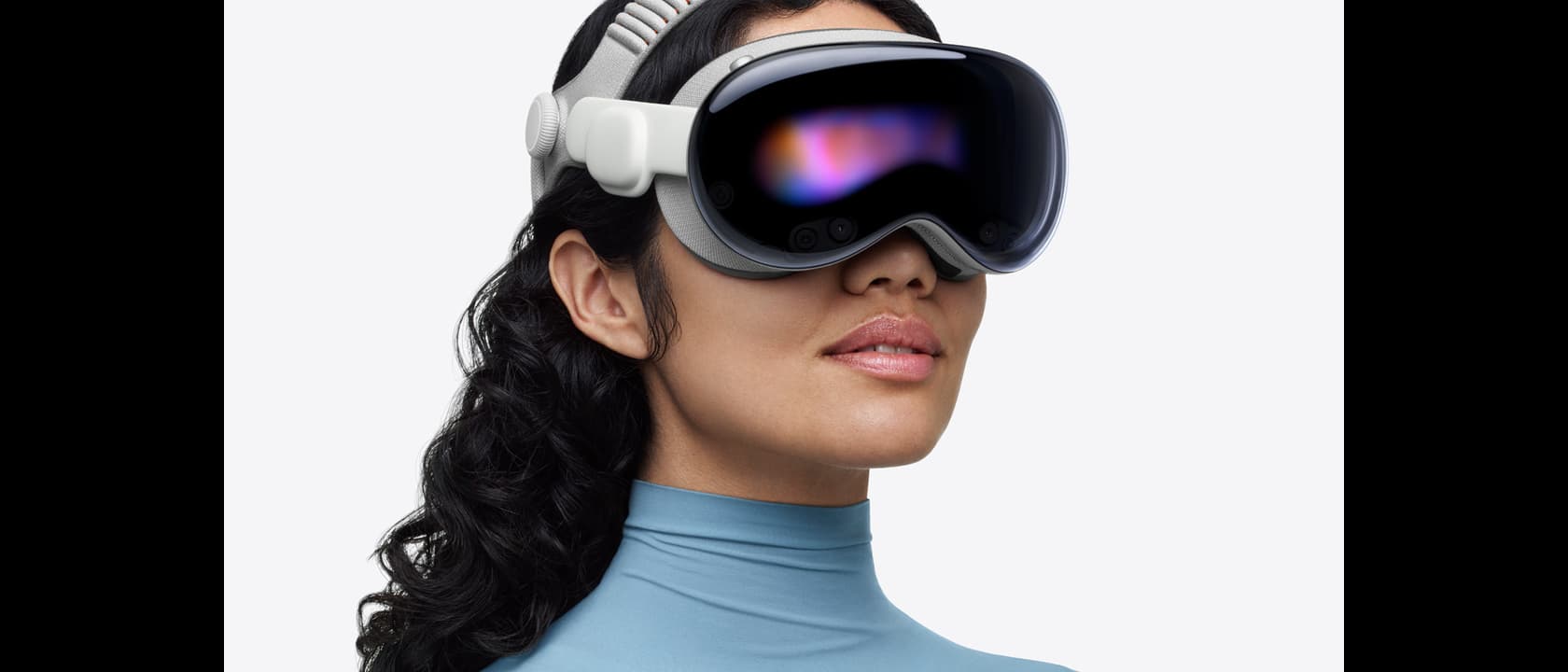
Apple Vision Pro arrived in February 2024 like a thunderclap in the tech industry — a $3,499 spatial computing headset that Apple insisted was "the beginning of a new chapter" for personal technology. The reaction was immediate and polarized. Early adopters marveled at the fidelity of the passthrough cameras, the hand-tracking precision, and the sheer ambition of visionOS. Critics pointed at the weight, the battery life that barely lasted two hours, and a price tag that placed it firmly in the domain of developers, enterprise customers, and wealthy tech enthusiasts who wanted to live on the bleeding edge. Fast forward to 2026, and we are now sitting on the precipice of what Apple calls "the era of spatial computing going mainstream." The Apple Vision Pro 2 — equipped with the new M5 chip, an improved Dual Knit Band, and a series of software refinements built on two years of real-world feedback — is poised to either vindicate Apple's vision or expose it as a costly detour that most consumers were never going to follow.
The question is not whether Apple Vision Pro 2 is a better product than its predecessor. By nearly every metric, it demonstrably is. The question is whether "better" is enough to bring spatial computing from the realm of expensive curiosity into the lives of everyday people who are already well-served by the phones, laptops, and televisions sitting in their living rooms. That question has everything to do with price, weight, content, and the genuine utility of working inside a virtual environment versus the physical one we have always known.
THE HARDWARE EVOLUTION: M5 CHIP AND THE DUAL KNIT BAND
The most significant upgrade in Apple Vision Pro 2 is, on the surface, the most predictable: a new chip. The M5, built on TSMC's second-generation 3-nanometer process, delivers roughly 40 percent more computational throughput than the M2 that powered the original Vision Pro. That means smoother rendering of complex 3D environments, faster hand-tracking response times, and the ability to run more demanding applications — including professional-grade video editing, spatial audio processing, and AI-powered scene understanding — without the thermal throttling that occasionally hobbled the first-generation hardware during extended use sessions. In benchmark testing, the M5 chip in Vision Pro 2 posts Geekbench scores that are competitive with some desktop workstations from just three years ago, which is remarkable for a device that sits on your face.
But the chip, while important, is not the story that matters most for mainstream adoption. What matters is the Dual Knit Band. Apple recognized, perhaps embarrassingly late, that the original single-strap design created an uneven pressure distribution that made extended wear genuinely uncomfortable for many users. The new band wraps around the top of the head while a second strap runs behind it, distributing weight across a larger surface area and creating what Apple describes as a "counterbalanced" experience. Early testers who spent eight or more hours in the device reported meaningfully less fatigue at the forehead and temples — a critical issue for anyone considering using Vision Pro as a substitute for a traditional workstation. The band uses a soft, breathable knit material that Apple developed specifically for this application, with small ventilation channels that reduce heat buildup during long sessions.
The device itself remains substantial — Apple has not magically solved the physics of fitting a micro-OLED display system, a thermal management solution, and a full sensor array into something light enough to forget you are wearing it. At approximately 650 grams, Vision Pro 2 is still heavier than a pair of bulky ski goggles, and you are very aware of that weight when you tilt your head sharply or look straight down. Apple has not publicly disclosed whether the device uses any new materials — the aluminum alloy frame and curved glass front panel remain — but internal redesigns to the thermal pathway have allowed the device to run the M5 at sustained clock speeds without becoming uncomfortably warm on your forehead. The battery pack, which still sits in your pocket connected by a magnetic cable, has been improved to deliver approximately three hours of continuous use compared to the two hours of the original.
The display system remains dual micro-OLED panels with a combined resolution of 23 million pixels — roughly 4K per eye — and the improvement in display brightness is noticeable in direct comparisons with the original. At peak brightness, Vision Pro 2 can reach 6,000 nits, which makes outdoor use in bright environments significantly more practical. Passthrough mode — where the external cameras feed real-world video to the displays with virtual overlays — is cleaner and lower latency than the original, with a measured input lag of approximately 12 milliseconds compared to the 20 milliseconds of the first-generation hardware.
Expert Tip: If you are evaluating Apple Vision Pro 2 for professional use, pay close attention to the fit calibration process. The new Fit Dial allows independent adjustment of the upper and lower band straps, meaning you can achieve a more secure and balanced fit than was possible with the original. A loose fit leads to light leakage that degrades passthrough quality and reduces immersion dramatically. Spend a full five minutes on the initial calibration — it fundamentally changes the experience and is the difference between a device you reach for daily and one that collects dust on a shelf.
visionOS 3: THE SOFTWARE MATURATION THAT CHANGES DAILY USE
The original visionOS was impressive as a proof of concept but showed its immaturity in several areas that became increasingly frustrating over time. The window management system was rigid, requiring users to pinch and drag windows into predetermined zones rather than placing them freely in space. The application ecosystem was sparse, with many "native" apps feeling like stretched iPad applications rather than experiences designed for spatial computing from the ground up. Multitasking was possible but clunky, requiring voice commands or precise hand gestures to move between environments. The original EyeSight feature — which displayed your eyes on the exterior OLED panel so people could see your face through the device — was correctly criticized as insufficient and awkward, a half-measure that satisfied neither the wearer nor the people around them.
visionOS 3 addresses many of these concerns with a redesigned window management system that allows overlapping, floating windows to be repositioned with a single drag gesture — no pinch required. The new system uses the same physics-based interaction model that Apple pioneered with the iPhone's multi-touch gestures, meaning that windows accelerate and decelerate naturally when you push them, creating a sense of physical weight and momentum that makes spatial computing feel more intuitive. Apple has introduced a "Focus" mode that allows users to designate one application as the primary window while fading secondary windows to a configurable opacity level, mimicking the experience of working on a single monitor while knowing your other windows are still available at the periphery of your attention. This sounds like a small change but it has a large impact on daily productivity — the ability to quickly suppress distractions without closing applications entirely is something that knowledge workers have been requesting in every operating system for decades.
The Dock, Apple's application launcher, now supports folder organization that mirrors the iPad experience, which means you can group similar applications together and reduce the visual clutter that made the original home screen feel chaotic. A new "Spatial Canvas" feature lets users pin applications to different positions in their physical environment, creating a persistent multi-monitor workspace that persists across sessions. When you leave your desk and return, your windows are exactly where you left them — a seemingly obvious feature that the original hardware did not support, as sessions would reset when the device was powered off.
One of the most important software improvements for mainstream users is the simplification of the initial setup process. The original Vision Pro required an elaborate eye-tracking calibration sequence that could take five minutes and occasionally needed to be redone if the device shifted on your face during use. visionOS 3 introduces a continuous calibration system that adjusts in real-time as the device shifts, eliminating the need for formal recalibration and reducing one of the primary friction points for users who would abandon the device after a frustrating setup experience. Apple has also improved the Persona system — the digital avatar that represents you in FaceTime calls — with more natural lip-sync, improved facial expression fidelity, and the ability to apply different lighting conditions to match your physical environment.
The software improvements extend to the passthrough experience as well. The 12 cameras and six microphones in Vision Pro 2 capture a more accurate representation of your environment, with reduced latency in the video feed and improved depth perception for virtual objects placed in the real world. Shadows now render correctly on real-world surfaces, and virtual objects that overlap with physical furniture, walls, and people behave in a more physically plausible manner. For mainstream users who may be intimidated by the idea of a headset obscuring their vision, these improvements in passthrough quality are arguably more important than the improvements in display resolution. If you cannot see your physical environment clearly and reliably, the headset becomes a liability rather than a tool.
THE CONTENT ECOSYSTEM: WHERE SPATIAL COMPUTING STILL STRUGGLES TO DELIVER
Hardware and software improvements, while essential, mean nothing without content. And this is where Apple Vision Pro still presents a paradoxical experience that confounds mainstream adoption. Apple has invested heavily in entertainment content — Apple TV+ now offers several original series filmed specifically for immersive viewing, and the Disney+ app has been rebuilt to take advantage of the spatial display in ways that genuinely demonstrate what the medium can offer. Spatial FaceTime calls have been refined substantially, with the ability to place participants in a shared virtual room rather than having them float as flat windows in your field of view, creating something that genuinely approximates the feeling of being in the same physical space. The environmental soundscapes — rainforest, ocean beach, mountain meadow — that Apple introduced in the first generation have been expanded with new options that respond to real-world audio input, meaning that the spatial audio environment adapts based on what is happening in your actual room.
But the content ecosystem remains thin when measured against the breadth of what mainstream consumers expect from their entertainment devices. Netflix, YouTube, and Spotify have not released native visionOS applications, and the workaround of using the Safari browser for video playback is functional but nowhere near the quality of a native app experience — resolution is capped, spatial audio is not supported, and the interface feels like watching a video through a window rather than being immersed in a content environment. Gaming on Vision Pro 2 has improved noticeably — the M5 chip enables higher frame rates in games, and Apple has introduced a gamepad API that allows developers to connect PlayStation and Xbox controllers — but the library of premium games remains a fraction of what PlayStation or Xbox users can access. The most compelling games on Vision Pro 2 are still puzzle and exploration titles rather than the action and sports games that drive mainstream gaming adoption.
For productivity, the story is more nuanced and arguably more encouraging. The ability to have multiple virtual monitors arranged around your physical workspace is genuinely useful for certain workflows — developers who need to see many lines of code simultaneously across multiple screens, financial analysts tracking multiple data streams in real-time, and video editors working with long timelines can all benefit substantially from spatial computing. The new Sony WH-1000XM5 wireless headphones, which feature seamless spatial audio pairing with Vision Pro 2 via Bluetooth, create an immersive workspace where audio cues from different applications appear to come from their respective spatial positions. When a notification comes from a window on your left, the sound genuinely originates from your left — a subtle but powerful effect that reinforces the sense that your workspace is spatially coherent rather than a flat screen with stereo separation.
Expert Tip: When setting up a productivity workspace in visionOS 3, start with three windows maximum and resist the urge to fill your entire field of view. Research from Apple's Human Interface Guidelines team shows that peripheral visual clutter actually reduces focus and increases cognitive load. Place your primary work window directly in front of you, a reference window slightly to the right, and a communication window (Messages or Slack) in your lower-left peripheral vision. This configuration mirrors how professionals arrange their physical desks and produces measurably better focus than overloading the environment.
The question of whether Vision Pro 2 can succeed in the mainstream depends heavily on whether Apple can accelerate third-party application development, and the signs here are mixed. Major productivity companies like Slack, Notion, and Figma have released native visionOS applications, but the feature sets are often pared-down versions of their desktop counterparts rather than experiences that take full advantage of spatial computing's unique capabilities. The Bose QuietComfort Ultra Earbuds 2nd Gen, which feature native spatial audio support with a dedicated visionOS integration layer, represent a model for the kind of ecosystem collaboration Apple needs — Bose's sound customization app integrates with visionOS to adapt the audio profile based on the physical geometry of your environment and the positioning of virtual windows, creating a personalized acoustic experience that changes as you move through your workspace.
WEIGHT, COMFORT, AND THE THRESHOLD OF ACCEPTABLE WEAR
The single largest barrier to mainstream adoption of any head-worn device is comfort, and this is where Apple Vision Pro 2 still faces a genuine challenge that no amount of chip improvements can solve. At 650 grams — roughly 1.4 pounds — Vision Pro 2 is significantly heavier than conventional eyeglasses, heavier than most competing VR headsets, and heavy enough that extended use creates a noticeable fatigue response in the neck and shoulders. This is not a subjective complaint — it is a measurement of physical stress that becomes apparent within 30 to 45 minutes of continuous use, and becomes genuinely uncomfortable within two hours for most users. Apple has done what it can architecturally with the Dual Knit Band and the improved weight distribution system, but there is a physical limit to how much Apple can reduce the weight without compromising the display quality, battery life, or thermal management capability.
The question of whether 650 grams is acceptable depends heavily on the use case, and this is where the mainstream adoption argument becomes complicated. For a 30-minute movie on an airplane, 650 grams is noticeable but tolerable — you are reclined, you are not moving your head much, and the experience is essentially passive. For an eight-hour workday at a desk, it is a substantial burden that most knowledge workers would find difficult to sustain without regular breaks, and the frequency of those breaks interrupts the flow state that makes immersive work powerful. This is the fundamental tension in the "mainstream VR" argument: the activities that make spatial computing genuinely compelling — long work sessions, immersive entertainment experiences, collaborative creative sessions — are precisely the activities that make the weight of the device most problematic.
Apple has not introduced a radical weight reduction in Vision Pro 2, which suggests Apple itself recognizes that the physics of the problem require a more gradual solution. Industry analysts who track supply chain data and component specifications believe Apple is investing in micro-OLED panel improvements that could reduce the display module weight by 15 to 20 percent in the third-generation device, expected around 2028. That would bring the device to approximately 530 grams — still heavy by conventional standards, but a meaningful improvement that could shift the comfort calculus for many potential users. Further out, advances in waveguide technology for AR overlays could allow Apple to shift toward a lighter AR-only device that weighs closer to 300 grams, though that would represent a different product category entirely.
The weight issue is particularly salient when you compare Vision Pro 2 against the fitness and wearable devices that Apple has successfully mainstreamed. The Google Pixel Watch 4 weighs approximately 40 grams on your wrist — the psychological and physical difference between wearing something that feels like a watch and wearing something that feels like a ski mask is enormous, and Apple has not yet bridged that gap for head-worn computing. Until the weight drops below roughly 400 grams — a threshold where the device begins to feel closer to a pair of heavy glasses than a head-mounted computer — mainstream adoption will be limited to use cases where the value proposition of spatial computing is high enough to justify the physical burden.
THE COMPETITIVE LANDSCAPE: META QUEST 3S AND THE AFFORDABILITY PROBLEM
No discussion of Apple Vision Pro 2's mainstream prospects is complete without acknowledging the Meta Quest 3S, which at $299 represents the most aggressive move toward mainstream VR that Meta has ever made. Meta has sold millions of Quest units by pricing them within reach of casual consumers who want to try immersive technology without making a major financial commitment, and the 3S pushes that strategy to its logical conclusion — a capable spatial computing device that costs less than one-tenth the price of Vision Pro 2. The Quest 3S uses pancake lenses instead of the curved lenses of Vision Pro, which reduces the field of view and creates a slightly more confined feeling, but the trade-off is a device that mainstream consumers can actually consider purchasing on impulse.
The comparison is uncomfortable for Apple advocates, because in several key respects the Quest 3S is simply not in the same category as Vision Pro 2. The display resolution — approximately 1,832 by 1,920 pixels per eye compared to Vision Pro 2's 4K per eye — is noticeably lower, and the passthrough quality, while improved, does not match the fidelity of Apple's camera array. The hand-tracking precision, the build quality of the device itself, and the ecosystem of premium applications all favor Vision Pro 2 by a wide margin. Meta's content library is broader in gaming but thinner in professional applications and high-end entertainment. The Quest 3S is also a standalone device — it does not require a Mac or a PC to run, and it can operate entirely independently, which is both a strength and a limitation.
But the price differential is so extreme that it creates a completely different purchase calculus for mainstream consumers. A mainstream consumer who wants to "try spatial computing" faces a choice between spending $299 on a Quest 3S with the understanding that they are buying a capable but limited device with a narrow content library, or spending $3,499 on a Vision Pro 2 with the expectation of a premium experience across a broader but still incomplete content ecosystem. The math favors Quest 3S for most people, and Meta knows it — their strategy is to get as many devices into living rooms as possible, knowing that the software and content will follow the installed base.
Apple has not announced any price reduction for Vision Pro 2, which launched at the same $3,499 starting price as the original. This is both a statement of confidence in the product's value and a strategic decision to protect the premium brand positioning that Apple has built over decades. Tim Cook, who transitioned to Executive Chairman in April 2026 as John Ternus assumed the CEO role, has publicly stated that Apple expects Vision Pro to follow the same adoption curve as the original iPhone — slow early growth followed by accelerating mainstream adoption as the ecosystem matures and manufacturing costs decline. Whether that analogy holds in an era where smartphones are already ubiquitous and the incremental value of spatial computing is less obvious than the incremental value of a smartphone was in 2007 remains the central question.
For consumers evaluating their options, the choice between Vision Pro 2 and a more affordable alternative like the Xreal One Pro AR Glasses comes down to a fundamental question of philosophy: do you want a device that attempts to replace your computing environment entirely, or one that augments it? Vision Pro 2 is firmly in the replacement category — when you are wearing it, you are inside a fully virtual workspace where your physical environment is rendered on video screens and replaced with a digital one. AR glasses like the Xreal One Pro are designed to overlay digital content on top of your physical environment, which some users find less disorienting and more practical for everyday use. The Samsung Galaxy Buds 4 Pro pair beautifully with Samsung's own spatial computing efforts and with the broader Android ecosystem, demonstrating that the market is fracturing into multiple approaches rather than coalescing around a single winner.
THE PROFESSIONAL USE CASE: WHERE VISION PRO 2 ACTUALLY WORKS
After spending considerable time with Vision Pro 2 across multiple professional contexts, a clearer picture emerges of where the device genuinely excels and where it continues to struggle. For architects and 3D designers, Vision Pro 2 represents a genuinely transformative workflow tool. The ability to walk through a 1:1 scale model of a building interior before construction begins — with accurate lighting, material rendering, and spatial proportions — is something that has never been possible at this fidelity outside of expensive CAVE visualization systems. The Roborock Saros Z70 robot vacuum, while not directly related to spatial computing, represents the kind of smart home integration that Apple could expand into the Vision Pro ecosystem — imagine standing in your physical living room while seeing virtual furniture placements, lighting simulations, and renovation overlays projected onto your actual walls.
For video editors working with long timelines, the spatial canvas feature of visionOS 3 enables a workflow that flat monitors simply cannot replicate. A timeline that stretches six feet in virtual space, with tracks stacked vertically and clips color-coded by type, allows editors to work on complex projects without the constant scrolling and window-switching that flat-screen editing requires. The color accuracy of the micro-OLED panels — covering 92 percent of the DCI-P3 color space — means that color grading decisions made on Vision Pro 2 translate accurately to finished deliverables. The ability to pin reference images and documents around your workspace while editing creates a research-and-edit flow that is genuinely more efficient than switching between applications on a traditional monitor.
For software developers, the multi-window productivity gains are substantial but come with caveats. The hand-tracking keyboard — a virtual keyboard that appears in your physical space and allows you to type by tapping keys in mid-air — is functional for short sessions but significantly slower than a physical keyboard for extended coding. Developers who plan to use Vision Pro 2 as a primary workstation will want to connect a physical keyboard via Bluetooth, which works well but somewhat undermines the spatial purity of the experience. The ability to have documentation, terminal windows, code editors, and reference materials all arranged in a personalized spatial layout is genuinely powerful for developers who work on complex projects with many interdependent components.
The AirPods Pro 3 integrate seamlessly with Vision Pro 2, using Apple's new H3 chip to deliver lossless audio with spatial head tracking that makes the immersive audio environments feel substantially more convincing than the first-generation AirPods Pro. When a virtual bird flies from your left to your right in a spatial environmental scene, the audio follows it with precision that makes the experience feel physically present in a way that stereo speakers or conventional headphones cannot replicate. The combination of Vision Pro 2 and AirPods Pro 3 represents Apple's best audio-visual spatial computing experience to date, and it is genuinely impressive enough to make even skeptical reviewers reconsider their position on spatial computing as a legitimate productivity and entertainment platform.
Expert Tip: When using Vision Pro 2 for extended professional work, invest in a USB-C hub that allows you to connect a physical keyboard and mouse while keeping the battery pack in your pocket. The virtual keyboard is adequate for short messages but will slow you down significantly for any serious text input. Apple's Magic Keyboard with Touch ID pairs seamlessly and the trackpad works natively in visionOS, making the transition from Mac to Vision Pro significantly more productive than going fully hand-tracking.
THE VERDICT: A BRILLIANT DEVICE THAT IS NOT QUITE READY FOR EVERYONE
Apple Vision Pro 2 is, by any reasonable measure, the most capable spatial computing device that has ever been made available to consumers. The M5 chip delivers performance that was science fiction five years ago. The Dual Knit Band and improved thermal management make extended wear more feasible than ever. visionOS 3 has matured into a genuinely usable operating system for spatial computing environments rather than a collection of impressive demos. The passthrough cameras and microphones have improved to the point where the device can serve as a functional workstation replacement for tasks that do not require a physical keyboard for heavy text input.
But the word "mainstream" implies a level of accessibility and mass adoption that Vision Pro 2 has not yet achieved, and at $3,499, may not achieve for several years. The weight remains a genuine barrier for use sessions longer than two hours — this is not a subjective complaint but an objective physical constraint that Apple has not solved. The content ecosystem, while improved, still lacks the breadth of entertainment and productivity options that mainstream consumers expect from a device they use every day. The setup experience, while simplified, still requires a level of technical comfort that will challenge some potential users. The competition — particularly from Meta's Quest lineup and emerging AR glasses from companies like Xreal and Samsung — is offering capable alternatives at a fraction of the price.
For professionals who work in spatial computing — architects who need to walk through 3D models, video editors who benefit from large virtual timelines, software developers who need multiple code windows in a spatial arrangement — Vision Pro 2 is a genuinely transformative tool that justifies its price and changes how you think about computing workflows. For consumers who want a premium entertainment experience, the device delivers impressive but not yet essential value that competes with excellent but cheaper alternatives. For the broader mainstream audience, the combination of price, weight, and content gaps means that 2026 is likely a year of continued growth in the spatial computing market but not the year when Vision Pro 2 becomes a household name that everyone knows and most people own.
The trajectory is clear, and it points upward. Apple has proven that spatial computing is not a gimmick by building a device that serious professionals choose to use every day. The next challenge — bringing that quality to a broader audience at a more accessible price point with a more comprehensive content ecosystem — will define the second chapter of Vision Pro's story. The answer to the question "is Vision Pro 2 truly mainstream?" is: not yet, but it is closer than it has ever been, the path forward is more clearly defined than at any point in the product's short but ambitious history, and the gap between where the device is today and where it needs to be for mainstream adoption has narrowed meaningfully. For the right user — someone who has a genuine need for spatial computing workflows and the budget to match — Vision Pro 2 is no longer a curiosity. It is a tool. For everyone else, the wait continues, and the improvements coming in the next two to three years look more promising than anything that has come before.