Attack Shark X65 HE Review: The Budget Hall Effect Keyboard That Punches Way Above Its Price
The Attack Shark X65 HE delivers Hall Effect switches, rapid trigger, adjustable actuation, and 8000Hz polling in a gasket-mounted 65% package for under $45 — an incredible value for competitive gamers.
You don't need to spend a hundred dollars to get a great gaming keyboard in 2026. That statement would have been borderline heresy a few years ago, when Hall Effect magnetic switches were exclusive to enthusiast boards like the Wooting 60HE and the Razer Huntsman V3 Pro, both of which commanded premium prices well north of $150. Back then, if you wanted rapid trigger functionality, you were looking at spending $175 or more just on the keyboard alone. The mechanical keyboard market has experienced a remarkable democratization since then, with brands like Attack Shark, MonsGeek, and Redragon bringing magnetic switch technology to budget-friendly price points without skimping on the features that make Hall Effect keyboards genuinely exciting for competitive gaming. The Attack Shark X65 HE is one of the most compelling examples of this trend — a 65% wired gaming keyboard that packs adjustable actuation, rapid trigger, an 8000Hz polling rate, and hot-swappable magnetic switches into a package that costs less than a decent dinner for two. After spending several weeks using it as my primary gaming and typing keyboard, swapping it between my desktop gaming rig and my laptop workstation, I can confidently say that the X65 HE represents the new baseline for what a budget gaming keyboard should deliver in 2026.
Build Quality and Design: Surprisingly Solid for the Price
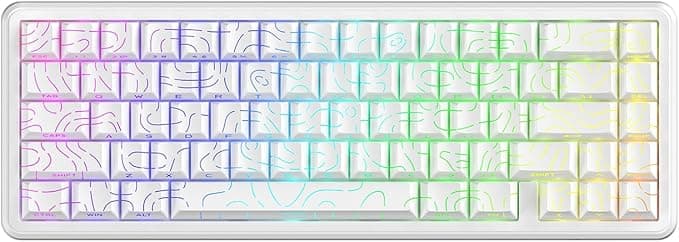
The Attack Shark X65 HE makes an overwhelmingly positive first impression that defies its modest price tag. The keyboard features a gasket-mounted design with a thick aluminum plate that gives it a substantial feel that I'd expect from keyboards costing twice as much. There's virtually no flex in the chassis, and the 1.3-pound weight is distributed evenly enough that it never slides around on my desk during intense gaming sessions — even when I'm panic-flicking in an Overwatch 2 team fight. The white colorway of the review unit (labeled "White Contour") is clean and modern, with double-shot PBT keycaps that resist shine and wear far better than the ABS caps typically found at this price point. The legend printing is crisp and consistent, and after weeks of heavy use, I see zero signs of fading or developing the greasy sheen that plagues cheaper keycaps.
The 65% form factor is a deliberate choice that prioritizes desk space and ergonomics over peripheral density. You get the arrow keys and a few navigation keys (Page Up, Page Down, Home, End via function layers) while shedding the number pad and function row entirely. This is the sweet spot for gaming — large enough to retain dedicated arrow keys for games that use them (looking at you, fighting games and roguelikes), but compact enough to leave generous room for mouse movement. The layout takes some adjustment if you're coming from a full-size keyboard, but the learning curve is gentle — within a day, I was navigating the function layers without looking, and after a week, reaching for a non-existent number pad felt like a distant memory. The compact footprint leaves ample room for sweeping mouse movements, which is a genuine advantage in first-person shooters where low sensitivity is the norm for precision aiming.
The case is constructed from a combination of plastic and aluminum, with the top plate providing most of the structural rigidity. The bottom of the case features a USB-C port (centered, which is appreciated for cable management) and a single toggle switch that primarily controls the RGB lighting effects rather than connectivity. There are no adjustable feet for tilt angle, which is a mild disappointment, but the default typing angle of roughly 6 degrees is comfortable enough for extended sessions. The included USB-C cable is braided and reasonably flexible — it's not a custom coiled cable, but it's a step above the thin, stiff cables that often ship with budget keyboards. The cable exits the keyboard centered on the rear edge, which works well with most cable management setups.
RGB lighting is bright and uniform across all keys, with per-key addressable LEDs that support a wide range of effects through the onboard controls. The south-facing LED orientation ensures that the lighting isn't obstructed by the keycaps from a seated viewing angle, and the white PBT caps diffuse the light nicely without the harsh hotspots you sometimes see on cheaper ABS caps. The lighting is controlled through a combination of the Fn key and the function row — Fn+Enter cycles through presets, Fn+arrows adjust brightness and speed, and Fn+Z toggles the rapid trigger mode indicator. It's not as intuitive as dedicated software with a graphical interface, but it's perfectly serviceable once you memorize the shortcuts. The RGB effects include static, breathing, wave, reactive (keys light up when pressed), and a few animated patterns, providing enough variety that most users will find a setting they like.
Hall Effect Switches and Performance
The headline feature of the Attack Shark X65 HE is its Hall Effect magnetic switches, and they perform admirably for a keyboard in this price range. Hall Effect switches use magnets and sensors to detect actuation rather than physical metal contacts, which gives them several advantages over traditional mechanical switches: they're rated for 100 million keystrokes (versus 50-80 million for standard mechanical switches), they never suffer from contact debounce issues, and they allow for continuously adjustable actuation points rather than fixed positions.
The stock magnetic switches in the X65 HE are smooth and consistent out of the box. There's minimal stem wobble — less than I expected at this price — and the factory lubrication is applied generously enough that the switches feel buttery from day one. The actuation force is roughly 40 grams, which is lighter than a typical Cherry MX Red (45g) but heavier than the ultra-light switches found in some competing Hall Effect boards. It strikes a good balance between preventing accidental presses and allowing rapid keystrokes during fast-paced gaming.
The adjustable actuation is configured through onboard controls without requiring software installation. By default, the actuation point is set to 2.0mm, but you can adjust it anywhere from 0.1mm to 3.4mm in 0.1mm increments using Fn+Up and Fn+Down. For gaming, I found 1.0mm to be the sweet spot — light enough for rapid double-taps but not so sensitive that I triggered presses while resting my fingers on the keys. For typing, I prefer a slightly deeper 1.8mm actuation to reduce accidental key registration.
Rapid trigger is the feature that competitive gamers care about most on a Hall Effect keyboard, and the X65 HE implements it well. Rapid trigger resets the actuation point the moment you start releasing a key, allowing for significantly faster repeated inputs than traditional mechanical switches. In practice, this means strafing in Counter-Strike 2 feels noticeably snappier — you can counter-strafe with precision that mechanical switches simply can't match. The 0.01mm rapid trigger accuracy is theoretically excellent, and while I don't have lab equipment to verify that claim, the real-world feel is responsive and immediate.
The 8000Hz polling rate is another spec that sounds impressive on paper and delivers tangible benefits in practice. Most gaming keyboards — even premium ones — use 1000Hz polling, which sends position data to your PC every millisecond. The X65 HE sends data every 0.125 milliseconds, which translates to lower input latency and smoother key registration during rapid inputs. Is the difference between 1000Hz and 8000Hz noticeable in everyday use? In most games, probably not. But in fast-paced competitive titles where every millisecond matters, the reduced latency is measurable and potentially meaningful. At minimum, it's a spec that punches well above the keyboard's price point.
Gaming Experience
I tested the Attack Shark X65 HE across several genres to get a comprehensive picture of its gaming performance. In Counter-Strike 2, the rapid trigger functionality proved genuinely advantageous for counter-strafing and peeking corners. The ability to re-fire a key without fully releasing it translates to faster ADAD spam, which gives you a meaningful edge in close-quarters engagements where micro-adjustments decide outcomes. The adjustable actuation also proved useful for grenade throws — I set a deeper actuation point for utility binds to prevent accidental pops during tense moments.
In Valorant, the experience was similarly positive. The keyboard's low latency and consistent switch performance made for predictable, repeatable inputs across all agents and abilities. Jiggle-peeking with the Operator felt snappier than on my previous mechanical keyboard, and the rapid trigger allowed for tighter movement control during duels. One important note: Valorant's in-game input buffer interacts with high-polling-rate keyboards in ways that can vary by system configuration, but I experienced no issues with the X65 HE across dozens of matches.
Call of Duty: Warzone benefited from the keyboard's responsive input as well, particularly in movement-heavy scenarios like slide-cancelling and mantling. The compact 65% layout left ample room for low-sensitivity mouse movements, which is a genuine advantage in a game where tracking targets at range requires fine cursor control. The RGB lighting proved useful for identifying key binds at a glance in dimly lit sessions, though the south-facing LEDs mean the key legends are illuminated primarily through light bleed around the caps rather than shining through the legends themselves.
For less competitive genres, the X65 HE still performs admirably. In RPGs like Baldur's Gate 3 and Elden Ring, the keyboard's responsive switches and comfortable typing angle made for fatigue-free extended sessions. The gasket mount provides a slightly softer bottom-out feel than a tray-mounted keyboard, which reduces finger fatigue during long play sessions. The PBT keycaps develop a pleasant textured feel as your fingertips warm up, providing subtle grip improvement over the ABS caps found on cheaper gaming keyboards.
Typing Experience
While the Attack Shark X65 HE is marketed as a gaming keyboard, I spent plenty of time typing on it as well — writing reviews, answering emails, and chatting on Discord. The typing experience is good for a Hall Effect keyboard, which is to say it's smooth and consistent but lacks the character and feedback of a well-tuned mechanical switch keyboard.
The linear magnetic switches provide no tactile bump or audible click, which means typing feels uniform and quiet — each keystroke is identical regardless of how hard you press. This is great for speed and consistency but can feel soulless compared to a keyboard with crisp tactile switches or satisfying clicky switches. If your primary use case is typing rather than gaming, you might prefer a mechanical keyboard with carefully selected switches rather than a Hall Effect board.
The gasket mount does add some compliance to the typing feel, softening the bottom-out impact compared to a rigid tray-mounted design. The sound profile is moderatly quiet with a soft clack rather than a sharp click, which makes the X65 HE a good choice for shared living spaces or open offices where mechanical keyboard noise might be disruptive. Stabilizers on the larger keys (spacebar, Enter, Shift) are factory-lubricated and produce minimal rattle — they're not quite as refined as what you'd find on a $200 enthusiast keyboard, but they're dramatically better than the rattly stabilizers that plague most budget mechanical keyboards.
Software and Customization
The Attack Shark X65 HE supports QMK web driver configuration, which means you can customize key mappings, macros, and lighting effects through a browser-based interface without installing any software. This is a genuinely consumer-friendly approach — there's no bloated application to download, no account creation required, and no telemetry to worry about. Plug the keyboard in, open the QMK web configurator in Chrome or Edge, and start customizing.
The web configurator allows you to remap any key to any function, create multi-step macros, adjust RGB lighting effects, and configure the actuation and rapid trigger settings. The interface is functional rather than beautiful, but it's easy enough to navigate that most users will be up and running within minutes. Settings are saved directly to the keyboard's onboard memory, so your customizations persist across computers without software overhead.
One limitation worth noting: the QMK web configurator doesn't support every feature that the keyboard offers. Some advanced settings — like per-key actuation point adjustment and specific rapid trigger configurations — are only accessible through the onboard Fn shortcuts rather than the software. This isn't a dealbreaker, but it means you'll need to memorize a few key combinations to access the keyboard's full feature set.
Competition and Value Proposition
The Attack Shark X65 HE enters a market that has become increasingly crowded with budget Hall Effect keyboards, though premium options like the Logitech G512 X 75 offer a unique analog-mechanical hybrid experience. The MonsGeek FUN60 Ultra, the NuPhy WH80, and the Attack Shark's own X65 Pro HE all compete in a similar price bracket with overlapping feature sets. Here's how the X65 HE stacks up.
The MonsGeek FUN60 Ultra ($59.99) offers similar magnetic switch technology with a 60% layout and a slightly more premium aluminum case. However, it lacks the dedicated arrow keys that the 65% X65 HE includes, which may be a dealbreaker for users who rely on arrow key navigation. The FUN60 Ultra also has a more limited 4000Hz polling rate versus the X65 HE's 8000Hz, though the real-world difference is marginal at best.
The NuPhy WH80 ($119) is significantly more expensive and offers wireless connectivity, which the X65 HE lacks. The WH80 also uses a more refined gasket mount system and ships with higher-quality PBT keycaps, but at more than double the price, it's targeting a different segment of the market entirely. If wireless connectivity is a must-have, the WH80 is worth the premium, but if you're happy with a wired connection, the X65 HE delivers most of the same performance for significantly less money.
The X65 Pro HE ($59.99) is Attack Shark's own wireless variant, which adds Bluetooth and 2.4GHz connectivity to the same basic platform. If you need wireless and trust the brand, the Pro HE is a logical upgrade at only a small premium. However, the wired X65 HE offers slightly lower latency (8000Hz vs 1000Hz in wireless mode) and eliminates the need to worry about battery life, which is a meaningful advantage for competitive gamers.
For the price, the Attack Shark X65 HE delivers an exceptional feature set that was unheard of in this price bracket just a year ago. The combination of Hall Effect switches, adjustable actuation, rapid trigger, 8000Hz polling, and gasket-mounted build quality represents a new standard for what $43 can buy in the gaming keyboard market. The fact that you get all of this for less than the price of a single AAA game title is remarkable and a testament to how far the mechanical keyboard market has come in democratizing once-exclusive technology.
Build Quality Comparison and Long-Term Durability
One area where the X65 HE's budget origins are more apparent is in the finer details of construction. The USB-C port is recessed but doesn't have the reinforced shielding you'd find on a more expensive board, which means you'll want to be careful when plugging and unplugging the cable. The rubber feet on the bottom of the case provide adequate grip on a desk pad but are on the smaller side — they could benefit from being wider to prevent any lateral sliding. The case itself is assembled with visible screw holes on the bottom plate that aren't covered, which is a cosmetic concession to cost-cutting that doesn't affect functionality but does remind you this is a budget product.
These are minor complaints in the context of the overall package. The PBT keycaps, gasket mount, and aluminum plate are the components that matter most for daily use, and they consistently punch above their weight class. The switches themselves are rated for 100 million keystrokes, which means the keyboard will likely outlast several PC builds before any switch needs replacement. And because the switches are hot-swappable, replacing a failed switch is as simple as pulling the old one out and clicking a new one in — no soldering required.
Who Should Buy the Attack Shark X65 HE
The Attack Shark X65 HE is an easy recommendation for competitive gamers who want Hall Effect performance without spending premium money. If you play fast-paced shooters where rapid trigger and adjustable actuation provide a measurable advantage, this keyboard delivers everything you need and nothing you don't. Pair it with a SteelSeries Arctis Nova Pro Omni wireless gaming headset for a complete competitive setup. The wired connection ensures consistent latency, the 65% layout maximizes desk space for mouse movement, and the build quality is good enough that you won't feel the need to upgrade anytime soon.
The keyboard is also a solid choice for budget-conscious buyers who want modern features without compromise. The Hall Effect switches are genuinely future-proof — they'll outlast any mechanical switch on the market, and the hot-swappable sockets mean you can replace switches if one ever fails without replacing the entire board. The PBT keycaps are durable, the RGB lighting is vibrant, and the gasket mount provides a typing experience that rivals keyboards costing twice as much.
The keyboard is less suitable for users who need a wireless connection, rely heavily on a number pad for data entry, or prefer a tactile or clicky typing feel. Hall Effect switches are inherently linear, so if you need tactile feedback for typing, a traditional mechanical keyboard with Brown or Blue switches would serve you better. Similarly, the 65% layout's reliance on function layers for navigation keys may frustrate users who frequently use dedicated Home, End, and Page keys without holding down the Fn modifier key.
For everyone else — and especially for competitive gamers on a budget — the Attack Shark X65 HE is one of the best values in the gaming keyboard market right now. It proves that you don't need to spend a premium to get premium input performance, and it sets a new baseline for what we should expect from budget gaming peripherals in 2026. The Hall Effect switches, rapid trigger functionality, and adjustable actuation deliver the competitive edge that matters in fast-paced titles, while the gasket-mounted build and PBT keycaps ensure the keyboard feels good enough for daily use beyond gaming. At roughly the price of a mid-range game, the X65 HE is an easy recommendation that's hard to beat on value.
Pros
- Hall Effect switches with adjustable actuation and rapid trigger
- Gasket-mounted build with aluminum plate feels premium
- Double-shot PBT keycaps resist shine and wear
- 8000Hz polling rate for minimal input latency
- QMK web configurator — no bloated software needed
Cons
- No wireless connectivity option on base model
- No adjustable feet for tilt angle customization
- Onboard-only configuration for advanced features
- USB-C port lacks reinforced shielding
Final Verdict
The Attack Shark X65 HE delivers Hall Effect switches, rapid trigger, adjustable actuation, and 8000Hz polling in a gasket-mounted 65% package for under $45 — an incredible value for competitive gamers.