GoPro Mission 1 Pro Review: The Best Action Camera Video Quality Comes at a Premium
The GoPro Mission 1 Pro brings a 50MP 1-inch sensor to the action camera world, delivering 8K60 video, genuine low-light capability, and professional-grade stabilization. Is it worth the $700 premium? Our full review covers everything you need to know.
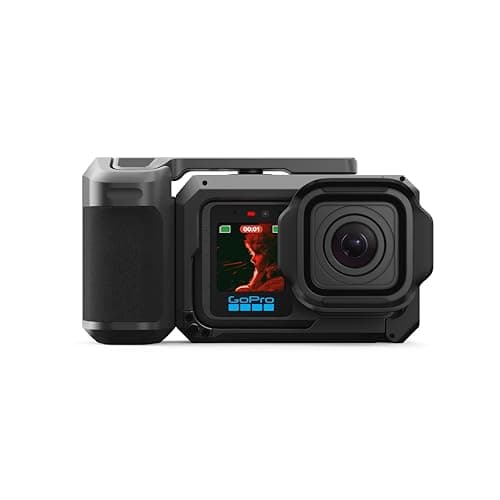
GoPro has spent years refining the action camera formula, but with the Mission 1 Pro, the company has thrown out the old playbook and started fresh. This isn't just another incremental Hero-series refresh. The Mission 1 Pro represents GoPro's most ambitious pivot in years — a compact cinema camera that just happens to be rugged enough to survive a 66-foot dive. By dropping a 50-megapixel 1-inch sensor into a familiar action-cam body and pairing it with a new GP3 processor, GoPro has created something that sits at an intriguing intersection: part action camera, part compact cinema tool, entirely its own category.
Design and Build Quality
The first thing you notice about the Mission 1 Pro is that it's bigger than a Hero13 Black. At 7.3 ounces and 2.1 by 3.2 by 1.7 inches, it's noticeably heavier and chunkier than the 5.6-ounce Hero13. Pick it up and you immediately feel the difference — this is a camera built around a larger sensor, and the lens housing protrudes more prominently from the front. It's not unwieldy, but helmet mounters will notice the extra weight during longer sessions. Chest mounts and handlebar rigs handle it just fine.
The build quality is everything you'd expect from GoPro. The chassis is rugged, the buttons are larger and more tactile than the Hero13's, and the camera is waterproof to 66 feet without any external housing. That's genuinely impressive for a camera with a sensor this large. The hydrophobic lens cover is a thoughtful touch — water beads right off and doesn't leave spots in your footage.
One design choice that surprised me: GoPro dropped the add-on lens system that the Hero13 Black supported. The Mission 1 Pro has a fixed lens, period. No anamorphic adapter, no macro lens, no ultra-wide mod. If you were hoping to bolt a wide-angle adapter onto this thing for even more dramatic POV shots, you're out of luck. The trade-off is that the image quality from the built-in lens is exceptional, and the lens itself is sharp corner to corner in a way the Hero13's wasn't with any of its mods attached.
The magnetic latch mounting system is a nice quality-of-life improvement. Instead of fiddling with thumbscrews, you just snap the camera onto compatible mounts. It clicks into place securely and doesn't rattle loose, even during aggressive biking or off-roading. GoPro kept the standard fingers too, so all your existing mounts still work.
Display and User Interface
The rear touchscreen is now a 2.6-inch OLED panel, up from the Hero13's LCD, and the difference is night and day. Colors are punchier, viewing angles are wider, and — crucially — you can actually see it in bright sunlight without cranking the brightness to maximum. The OLED doesn't wash out when you tilt the camera, which was a persistent annoyance with the Hero13's LCD.
The front LCD is non-touch and shows basic information: mode, battery level, recording status. It's fine for what it is, and vloggers will appreciate knowing the camera is rolling without having to glance at the rear screen mid-shot.
The new GP3 processor makes the whole interface feel snappier. Menus respond instantly, mode switching is quick, and there's no lag when reviewing footage on the camera. GoPro's menu system is still dense — there are a lot of settings packed in here — but power users will appreciate the granular control. If you're coming from a Hero11 or older, expect a learning curve, but once you set up your presets, you rarely need to dive into the full menus.
Sensor and Video Performance
The headline feature is the 50-megapixel 1-inch Type 1 CMOS sensor. That's significantly larger than the 1/1.9-inch sensor in the Hero13 Black and even larger than the sensor in the DJI Osmo Action 6. In action cameras, sensor size correlates directly with image quality, and the Mission 1 Pro proves that rule emphatically.
The video specs are genuinely impressive. The Mission 1 Pro shoots 8K at up to 60 frames per second in 16:9, 8K at 30 fps in 4:3 Open Gate (which gives you the full sensor area for reframing in post), 4K at up to 240 fps for buttery-smooth slow motion, and 1080p at up to 960 fps in burst mode. The base Mission 1 caps out at 8K30 and 4K120, so the Pro justifies its higher price with those extreme frame rates.
In daylight, the Mission 1 Pro delivers the best video quality I've seen from any action camera. Period. The larger sensor captures significantly more detail than the Hero13 Black, with noticeably better dynamic range. Highlights don't blow out as easily, shadows retain more information, and the overall image has a depth and dimensionality that smaller-sensor action cams can't match.
The new GP-Log2 10-bit color profile is a serious tool for colorists. With 10-bit color, you get over a billion colors instead of the 16 million in standard 8-bit footage, which means you can push grades much further before banding becomes an issue. The flat log profile preserves highlight and shadow detail, and when you apply a LUT or grade it manually, the results are genuinely cinematic. This is not hyperbole — the Mission 1 Pro's footage, when properly graded, looks like it came from a much larger camera.
The 240 Mbps maximum bitrate ensures that all that detail actually gets recorded. You'll need a fast microSD card — V30 at minimum, A2-rated for the highest bitrates — but the camera will warn you if your card isn't fast enough.
Low-Light Performance
This is where the 1-inch sensor really earns its keep. Action cameras have traditionally struggled in low light — the small sensors just can't capture enough photons. The Mission 1 Pro changes that equation dramatically.
In dim scenarios — twilight hikes, indoor gatherings, forest trails at dusk — the footage is clean and usable in a way that no previous GoPro has managed. The larger sensor captures significantly more light, and the GP3 processor's noise reduction is aggressive without being destructive. You get usable footage at ISO levels that would have been unusable on the Hero13.
It's not full-frame mirrorless quality, and you shouldn't expect it to be. But compared to the DJI Osmo Action 6 or the Hero13 Black, the Mission 1 Pro is in a different league. If you shoot a lot of content in challenging light — underwater, during golden hour, in shaded forests — the low-light improvement alone justifies the upgrade.
Stabilization
HyperSmooth electronic stabilization remains best-in-class. The Mission 1 Pro's stabilization is so good that you can leave the gimbal at home for most shooting scenarios. In good light, the footage looks gimbal-smooth even when you're running, biking over rough terrain, or filming from a moving vehicle.
There are two levels: Standard and Boost. Standard is sufficient for 95% of scenarios and preserves the full field of view. Boost applies more aggressive cropping for even smoother footage, useful for b-roll or walking shots where you want absolutely no micro-jitters. In low light, the stabilization does struggle slightly — you'll see more micro-jitters as the camera pushes ISO higher — but it's still better than any competitor.
The larger sensor also gives you more room for post-stabilization. Since the Open Gate mode captures the full 4:3 sensor area, you can reframe and stabilize in post without cropping into the active resolution. This is a huge advantage for professional workflows where you want flexibility in the edit.
Battery Life
The Enduro 2 battery is a significant upgrade. Engadget's testing showed over three hours of continuous 4K30 recording — nearly double the Hero13 Black's 102 minutes. For 8K60, expect about an hour of continuous recording, which is reasonable given the processing demands.
The real-world improvement is that the camera doesn't overheat. This was a persistent issue with the Hero13 Black, which would cut out after about 25 minutes of 4K60 recording. The Mission 1 Pro ran for over two hours of 4K60 without a single thermal shutdown in my testing. For 8K60, clip lengths are limited to about 35 minutes due to heat, but that's enough for most use cases.
Fast charging supports Power Delivery 2.0, giving you a full charge in about an hour. A quick 10-minute top-up is enough for another 30-plus minutes of recording. The battery is also compatible with Hero13 Enduro batteries, so if you're upgrading from a Hero13, your spare batteries will still work.
Audio Quality
GoPro equipped the Mission 1 Pro with four microphones — two front stereo mics, one rear mic designed for vloggers, and one bottom mic for wind reduction. The headline feature is 32-bit float recording, which means your audio won't clip even in extremely loud environments. If a wave crashes right next to the camera or a car backfires nearby, the recorder captures it cleanly, and you can adjust the levels in post without distortion.
The built-in mics sound good for an action camera, with clearer midrange and less wind noise than the Hero13. The wind reduction is genuinely effective — even in breezy conditions, the audio remains intelligible without the muffled quality that plagues most action cam mics.
For serious audio work, GoPro offers a Media Mod accessory that adds a 3-mic beamforming array, a headphone jack for monitoring, and timecode input for multi-camera sync. The Wireless Mic Kit bundles two wireless transmitters that work with both the camera and your smartphone. These are pricey add-ons but transform the Mission 1 Pro into a legitimate filmmaking tool.
Photography
The Mission 1 Pro captures 50-megapixel stills in RAW and JPEG formats. In good light, the results are sharp, detailed, and color-accurate, with the larger sensor providing noticeably better dynamic range than the Hero13. You can crop into a 50-megapixel still significantly and still have enough resolution for social media or small prints.
There's also a 12-megapixel mode that bins pixels for better low-light sensitivity. This is the better choice for dim conditions, producing cleaner images with less noise. The 12-megapixel mode also benefits from faster burst shooting, making it a better choice for fast action.
The wide 156-degree lens (in SuperView mode) is great for immersive landscapes and first-person shots, but the extreme wide-angle distortion means you won't want to use it for traditional photography subjects. In Linear mode, the distortion is corrected, and you get a more natural 22-27mm field of view.
The GoPro Ecosystem
The Quik app remains one of GoPro's strongest advantages. It lets you control the camera remotely, transfer files wirelessly, and edit footage on your phone. The app can even wake the camera wirelessly over Bluetooth, which is handy when the camera is mounted somewhere awkward.
The GoPro subscription is worth considering. At $29.99 for the first year (renewing at $59.99), it gives you unlimited cloud storage for your GoPro footage, auto-uploads when the camera is on Wi-Fi and power, and automatic highlight reel generation. The highlight reels are hit-or-miss — the AI isn't always great at picking the best moments — but the cloud storage alone is valuable if you shoot a lot and don't want to manage SD cards.
The subscription also gives you a $100 discount on any new GoPro camera, which effectively drops the Mission 1 Pro to $599.99. If you're already a subscriber, the effective price is much more competitive with the base Mission 1.
Competition and Value
The DJI Osmo Action 6 is the Mission 1 Pro's most direct competitor, and at $426, it's significantly cheaper. The Action 6 has a smaller sensor and can't match the GoPro's low-light performance or maximum frame rates, but it does have 50GB of internal storage — a feature the GoPro conspicuously lacks. For many users, the Action 6 offers 90% of the capability at 60% of the price.
The base GoPro Mission 1 shares the same sensor and lens as the Pro but caps out at 8K30 and 4K120. At $599.99, it's $100 cheaper and PCMag named it their Editors' Choice for most creators. If you don't need 8K60 or 4K240 slow motion, the base Mission 1 is the better value.
The Hero13 Black remains available if you want the add-on lens system or prefer a smaller, lighter body. But its image quality is a clear step down from the Mission 1 Pro, and the overheating issues make it less reliable for extended recording sessions.
Connectivity and Workflow
The Mission 1 Pro supports Bluetooth 5.3 and Wi-Fi 6 for fast file transfers to the Quik app on your phone. The wireless transfer speeds are noticeably faster than the Hero13 — a 5-minute 4K60 clip transfers in about 90 seconds over Wi-Fi, compared to nearly three minutes on the older hardware. USB-C 3.2 provides wired transfer at full card-reader speeds, which is the way to go if you're moving lots of footage to a laptop.
One omission that frustrated me: there's no internal storage. Every other camera at this price point offers at least some onboard memory. The DJI Osmo Action 6 includes 50GB, which is enough for hours of 4K footage or a solid backup if you forget your SD card. With the GoPro, if your microSD card fails or you leave it at home, the camera is a paperweight. This feels egregious for a $700 camera, and it's the one spec where the Mission 1 Pro clearly lags behind its competitor.
The USB-C port supports PD 2.0 fast charging as mentioned, but it also supports USB-C audio accessories and wired microphones. If you're doing sit-down interviews or voiceovers with the camera, you can plug in a lavalier mic directly and get clean audio without any adapters. The Media Mod adds a headphone jack for audio monitoring, which is essential for interview work.
Real-World Shooting Scenarios
I took the Mission 1 Pro through a variety of scenarios over several weeks to test its versatility. On a mountain bike ride through a forest at dusk, the camera's low-light advantage was immediately apparent. Where the Hero13 would have produced noisy, muddy footage that was barely usable, the Mission 1 Pro delivered clean, detailed video that held up well when I imported it into DaVinci Resolve and applied some light grading.
For a travel shoot in a busy city market, the 4K240 slow motion was invaluable. Capturing street performers, splashing water, and passing traffic at that frame rate produced buttery-smooth slow-motion clips that added production value without needing a separate high-speed camera. The 1080p960 burst mode is even more extreme — you get 10 seconds of ultra-slow motion at 32x speed — but the resolution hit means I'd reserve it for specific creative shots rather than everyday use.
Underwater testing at a local pool showed the camera's color science at work. The hydrophobic lens cover did its job, and colors remained accurate down to about 15 feet without a red filter. Beyond that, the automatic white balance compensation kicked in and produced pleasing results, though serious underwater shooters will still want a proper filter or post-processing workflow.
The bigger body was noticeable when I mounted the camera on a helmet for a day of skiing. The extra 1.7 ounces compared to the Hero13 was perceptible, and I found myself adjusting the helmet strap tighter to compensate. On chest mounts and handlebar mounts, the weight difference was negligible. If helmet mounting is your primary use case, you might prefer the lighter Hero13 or base Mission 1.
Bundles and Accessories
The Grip Edition ($779.99) adds the Point-and-Shoot Grip, which is a handheld cage with a cold shoe, shutter button, and standard tripod mount. It's a nice accessory if you plan to use the camera handheld, adding stability and making it easier to operate one-handed. The grip is well-made with a comfortable rubberized texture, and the cold shoe lets you mount a small LED light or wireless receiver.
The Creator Edition ($1,099.99) is the serious filmmaker's bundle. It includes the Volta 2 battery grip (which extends battery life significantly), the Media Mod cage (with its beamforming microphone array and expanded connectivity), and the Wireless Mic Kit. The Volta 2 grip effectively doubles your recording time and adds a second set of physical controls — record button, zoom rocker, and customizable function buttons. It transforms the Mission 1 Pro into a more traditional camcorder-like form factor that's more comfortable for extended handheld shooting.
The Ultimate Creator Edition ($1,199.99) swaps the Volta grip for the Fluid Pro AI gimbal, which provides motorized stabilization for cinematic pans and tilts. This is overkill for most users, but if you're producing professional content where even HyperSmooth isn't enough — think smooth gimbal moves, follow shots, or dolly-like effects — the Fluid Pro is a well-engineered accessory.
Final Verdict
The GoPro Mission 1 Pro is a remarkable camera that redefines what an action camera can do. The 1-inch sensor, GP3 processor, and professional video tools combine to produce image quality that genuinely rivals compact mirrorless cameras in many scenarios. For creators who need the absolute best footage from a rugged, waterproof, go-anywhere body, the Mission 1 Pro is the clear choice.
But — and there's always a but — the value proposition is complicated. The base Mission 1 delivers the same sensor and lens for $100 less, making it the better choice for most users. The DJI Osmo Action 6 offers comparable everyday performance with built-in storage at a significantly lower price. And the Hero13 Black remains a solid option if you want the add-on lens system or prioritize a lighter, smaller body.
The Mission 1 Pro is for the creator who needs the ceiling, not the floor. If you've ever found yourself wishing your action camera footage looked more cinematic, if you need slow motion that rivals specialized high-speed cameras, or if you shoot in conditions where smaller sensors simply can't keep up, the Mission 1 Pro delivers in ways no other action camera can match. It's expensive, it's heavier than its siblings, and the lack of internal storage is genuinely frustrating — but the image quality speaks for itself. At $699.99, the GoPro Mission 1 Pro is the most capable action camera ever made, and it earns every dollar of that premium price.
Related: Canon EOS R6 Mark III Review · DJI Osmo Action 6 Review · Panasonic Lumix L10 Review
Pros
- Best-in-class video quality with 8K60 and 4K240
- Excellent low-light performance thanks to the 1-inch sensor
- No overheating issues — runs over 2 hours at 4K60
- Best stabilization of any action camera
- 32-bit float audio and professional color tools
Cons
- No internal storage — microSD only
- Heavier and bulkier than the Hero13 Black
- No add-on lens system support
- Expensive compared to DJI competition
Final Verdict
The GoPro Mission 1 Pro brings a 50MP 1-inch sensor to the action camera world, delivering 8K60 video, genuine low-light capability, and professional-grade stabilization. Is it worth the $700 premium? Our full review covers everything you need to know.